
Altrady is our first recommendation for active crypto traders choosing trading software. It connects 19+ exchanges in one workspace and adds the things an exchange account does not give you on its own: scanning across markets, automation, a trading journal, a portfolio view that spans every connected account, and smart orders with automatic take profit and stop loss. Below we compare it with Coinigy and TradingView, and with the trading tools built into five exchanges you may already use.
Altrady publishes this comparison, so weigh our entry accordingly and check every price yourself. Research date 17 October 2026, based on official product pages, published pricing and vendor documentation. We did not run hands-on tests of the competing platforms.
Key Takeaways
- Altrady is our pick for traders running more than one exchange. One workspace for scanning, smart orders, automation, journaling and a portfolio across every connected account, non-custodially, with API keys that carry no withdrawal permission.
- "Trading software" and "an exchange" are two different purchases. An exchange holds your money and matches orders. Trading software sits on top of the accounts you already have. Most lists mix the two, which is why they are hard to decide from.
- Automation is not one feature. Altrady runs six bots, each defined by what sets it off: a price range, a safety-order ladder, a buying schedule, a TradingView alert, a signal provider or your own system. Exchange-native bots are usually grid and DCA only, and only on that exchange.
- Charting and execution are usually separate products. TradingView is the strongest charting and scripting tool here, but it is not a crypto execution platform; its alerts are commonly used to drive software that does execute.
- Count the real cost. Software subscriptions sit on top of exchange trading fees, and several tools here overlap, so a journal plus a bot platform plus a charting plan can bill you twice for one workflow.
What Crypto Trading Software Actually Is
Most "best crypto trading software" lists put exchanges and software in one ranking. That makes them hard to act on, because the two answer different questions.
An exchange is where your money sits and where your orders are matched. Binance, Kraken, KuCoin, Coinbase and Poloniex are exchanges. You need at least one, and the questions that matter are custody, fees, regional availability and which markets are listed.
Trading software connects to the exchange accounts you already hold, usually through API keys, and adds what the exchange does not: scanning many markets at once, automation that follows your rules, a journal that tells you how you actually traded, a portfolio view spanning several accounts, and richer order handling.
This guide covers both, but keeps them apart. The first group is software you run on top of your accounts. The second is the tooling each exchange gives you inside its own platform, which is free to use but stops at that exchange's door.
One more thing worth settling early: connecting software to an exchange does not hand over your coins. Altrady connects through API keys created without withdrawal permission, so the software can place and manage orders but cannot move funds off the exchange. Check that any tool you evaluate works the same way.
How We Compared These Tools
Research date: 17 October 2026. Altrady's own facts were checked against its Help Center documentation and its live pricing and exchange pages on that date. Competitor facts come from each vendor's official product and pricing pages, read the same day. We did not run hands-on tests of the competing platforms, and nothing here is presented as a hands-on review.
We compared on things you can check yourself:
- What it is for, and whether it replaces your exchange or sits on top of it.
- Exchange coverage, and whether a tool spans several accounts or only one venue.
- Automation, separated by what triggers it rather than lumped together as "bots".
- Analysis: charting, scanning, backtesting and journaling, with plan limits where they are published.
- Order handling, including automatic take profit and stop loss.
- Price, in the currency each vendor publishes, with the billing basis stated and not converted.
Where a vendor's page is silent we record it as not stated rather than assuming the feature is missing. There is no overall score: every entry carries the same structure and the same limitations section.
The Best Crypto Trading Software in 2026
1. Altrady: best for trading across several exchanges from one workspace
Altrady is a multi-exchange trading platform. You connect the exchange accounts you already have and run the whole workflow in one place: finding the setup, placing and managing the order, automating what you want automated, and reviewing what happened afterwards. It is not an exchange, it does not hold your funds, and the API keys you connect are created without withdrawal permission.
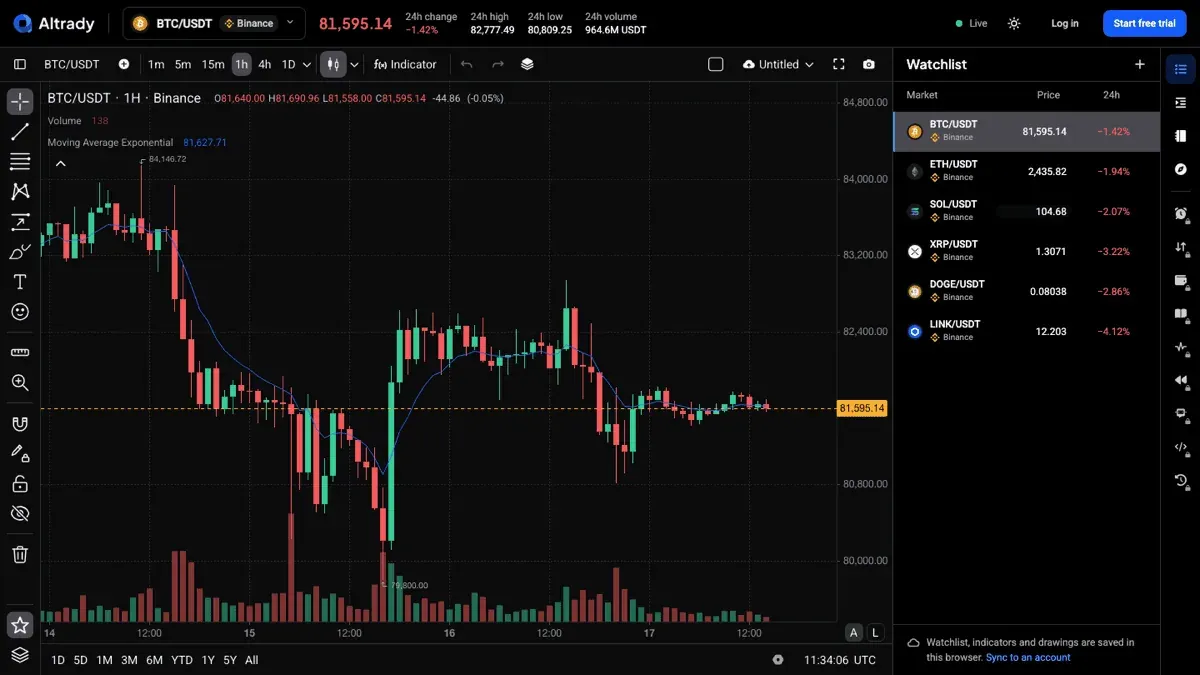
Scanning and analysis. Four scanners cover different jobs: a TA scanner for technical conditions, a base scanner for markets forming a base, a quick scanner, and a market explorer. Altrady Charts is the charting side, with its own drawing tools, built-in indicators and multi-chart layouts, and it is available on every paid plan.
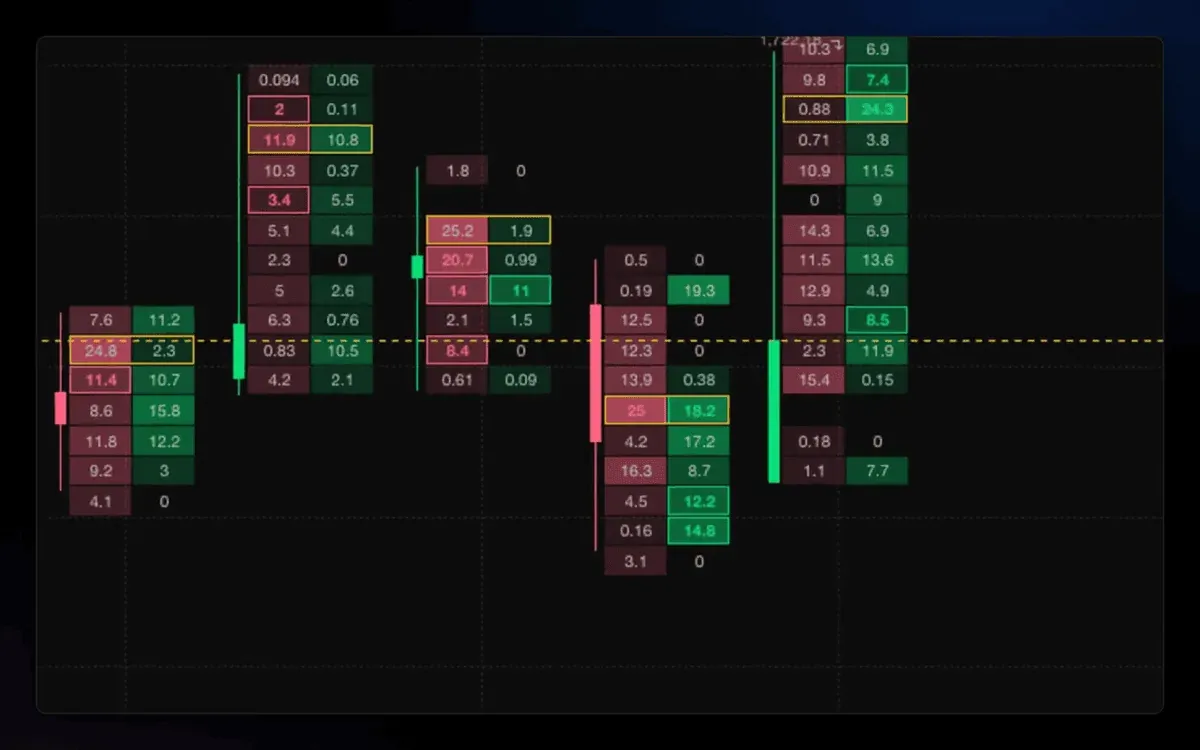
Order flow. Footprint charts show bid and ask volume at every price inside each candle, with imbalances highlighted. It is the detail a standard candle hides, and it is the kind of tool exchange-native charting rarely includes.
Order handling. Every paid plan includes smart trading with automatic take profit and stop loss, trading presets you can reuse, and spot and futures trading. Positions carry their own profit and loss view. Worth knowing before you rely on it: if a subscription lapses, the API keys are disabled and Altrady stops managing those smart orders, though orders already resting on the exchange stay there for you to handle directly.
Six bots, separated by what starts them. This is the part most comparisons flatten into the word "bots". The difference between them is the trigger, not the strategy:
- Grid Bot. You set a price range and divide it into levels; the bot places buys below and sells above and cycles them as price moves through the range. You can backtest the setup first. Spot markets only, and one per market per trading account.
- DCA Bot. You choose how it opens, immediately, when your indicator conditions turn true at a candle close, or after a price move you define, then a safety-order ladder builds the position and a take profit or stop loss closes it. Runs on spot and futures, and on futures it can short the spike as well as buy the drop.
- HODL Bot. Buys the same amount on a schedule, say every Monday at 09:00, to accumulate over time. Spot markets only. Worth knowing before you set one up: it only buys. There is no take profit and no stop loss.
- TradingView Bot. Follows your Pine Script alerts, turning a TradingView strategy into entries, exits and position management on your connected exchanges.
- Signal Bot. Follows a signal provider, either Altrady's own Crypto Base Scanner or a supported third party, and turns incoming signals into managed positions. Runs on spot and futures.
- Webhook Bot. Takes instructions from your own system, so your strategy and logic stay where they are and Altrady handles the supported trading actions.
How many you can run at once is set by your plan: 2 on Basic, 5 on Essential and 50 on Premium.
Journal and portfolio. The trading journal turns closed trades into figures you can judge yourself by, and you can attach a saved strategy with its own checklist and risk profile so you can see how closely you followed your own rules. Journal reports are on the Essential and Premium plans, not Basic. The portfolio view spans every connected account, which is the part that is genuinely awkward to reproduce if you trade on several exchanges.
Backtesting, with its limits stated. Backtesting is available on the free tier at two backtests a month against seven days of historical data. The Backtesting Pro add-on removes both limits, giving unlimited backtests and full history. Any backtest is a simulation: past performance does not guarantee future results.
Plans and what changes between them. Every paid plan includes smart trading, spot and futures, the multi-exchange portfolio, multi-charts and support. What changes is headroom:
- Basic: 5 trading accounts, 2 bots, 50 price alerts, TA Scanner with reduced limits.
- Essential: 15 trading accounts, 5 bots, higher alert limits, Quick and Base scanners, smart money indicator.
- Premium: 30 trading accounts, 50 bots, 1,000 price alerts and 200 trend line alerts, TA Scanner Plus included, data export.
Two optional add-ons sit on top of any paid plan: TA Scanner Plus, which is already included with Premium, and Backtesting Pro.
Main strengths. One workspace across 19+ exchanges; scanners built for finding setups rather than just drawing them; automation separated by trigger; a journal that measures adherence to your own rules, not just profit and loss; non-custodial connections with no withdrawal permission.
Material limitations. Crypto only, so no equities, forex or traditional futures. Grid bots are spot-only. Journal reports need Essential or above. Meaningful backtesting needs the paid add-on. And it is a subscription on top of the trading fees you already pay your exchange, which only pays for itself if you use more than one of these capabilities.
Free access. A FREE plan lets you explore the platform and practise with paper trading, and paper trading keeps working even if a paid subscription lapses. Every new account also gets a 5-day free trial of the full platform with no credit card.
Plan and price. Basic EUR 28, Essential EUR 50 and Premium EUR 90 a month on monthly billing. On annual billing the same plans work out at EUR 20, EUR 35 and EUR 63 a month, advertised as a 30% saving where you pay for ten months and get twelve. Checked on the pricing page, 17 October 2026.
Best suited for: active traders running several exchange accounts who want scanning, execution, automation and review in one place.
2. Coinigy: best for a long-established multi-exchange dashboard
Coinigy is the other tool in this guide built around connecting many exchange accounts to one interface. It has been in the market a long time, and it leans towards charting and portfolio monitoring rather than automation.
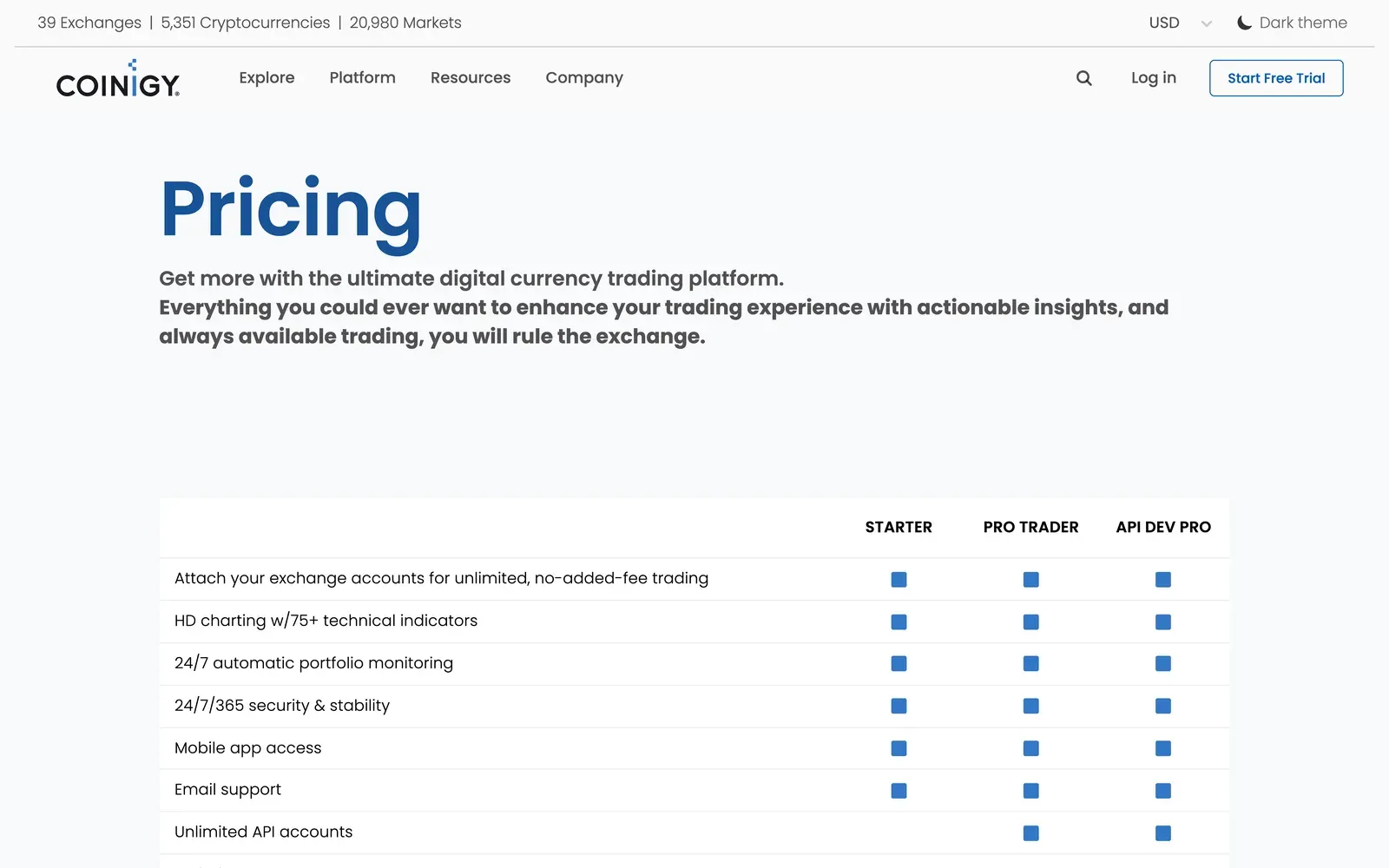
What it offers. The pricing page lists HD charting with 75+ technical indicators, 24/7 automatic portfolio monitoring, mobile app access, advanced order types, unlimited chart layouts and unlimited API accounts, with priority support and CryptoFeed and enterprise API access on the top tier. The site states coverage of 39 exchanges, 5,351 cryptocurrencies and 20,980 markets.
Automation. Not stated on the pricing page. Treat Coinigy as a dashboard and charting tool rather than a bot platform unless the vendor tells you otherwise.
Plan and price. Starter is free with a 7-day trial, Pro Trader is USD 18.66 a month and API Dev Pro is USD 99.99 a month, checked 17 October 2026. Payment is accepted by card, PayPal and cryptocurrency.
Material limitations. Automation and backtesting are not described on the pricing page. The site carries a 2025 copyright notice and a v2.0.8 version string, so confirm the current release and roadmap with the vendor if active development matters to you.
Best suited for: traders who want one dashboard over many exchange accounts, and who do their automating elsewhere or not at all.
3. TradingView: best for charting, scripting and alerts
TradingView is the strongest charting and scripting product in this guide, and the one most likely to sit alongside your trading software rather than replace it.
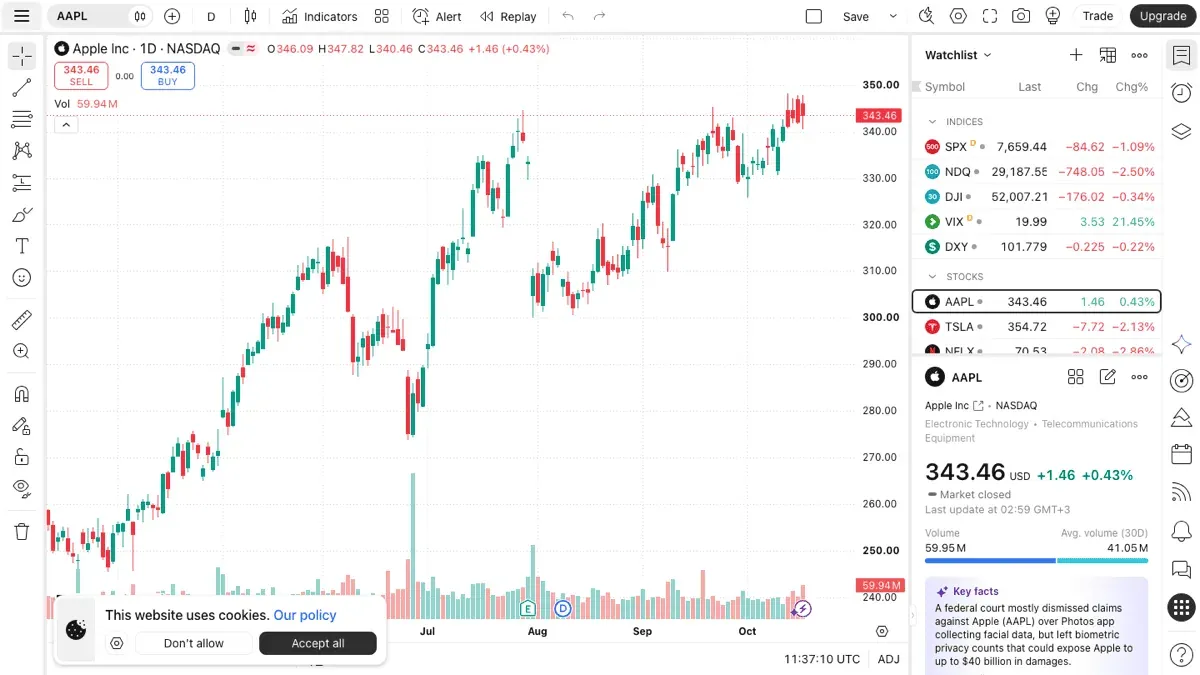
What it offers. Multi-asset charting well beyond crypto, Pine Script for custom indicators and strategies, a large public script library, bar replay, and alerts that can fire on your own conditions.
How it fits with execution. TradingView supports trading through integrated brokers, but for crypto most people use it as the analysis layer and send its alerts somewhere that executes. That is exactly what Altrady's signal bot consumes: a TradingView webhook alert from your own indicator or strategy can open and manage a position on your connected exchange.
Plan and price. Essential EUR 12.95, Plus EUR 29.95, Premium EUR 59.95 and Ultimate EUR 199.95 a month, shown as special pricing on annual billing and checked 17 October 2026. Monthly billing costs more. A free tier is available.
Material limitations. It is not a crypto execution platform on its own, it does not connect your exchange accounts for portfolio or journaling purposes, and the plan you need is decided by limits such as charts per tab, indicators per chart and alert counts rather than by asset class.
Best suited for: traders whose bottleneck is analysis, and anyone who wants to drive automation from their own scripted conditions.
Exchange-Native Trading Tools
Every major exchange now ships tooling of its own, and for a trader who uses one venue it is often enough. The trade-off is the same in each case: it is included with the account and needs no extra subscription, but it only ever sees that exchange. If you hold balances on three venues, exchange-native tools give you three separate views and three separate sets of bots.
Fees below are the exchange's trading fees, which are tiered by 30-day volume and by whether you add or take liquidity. The headline rate applies at the lowest tier only, so check the live schedule before comparing.
4. Binance: best exchange-native bot selection
Binance has the widest built-in automation of the exchanges here, packaged as a Trading Bots marketplace rather than a single bot.
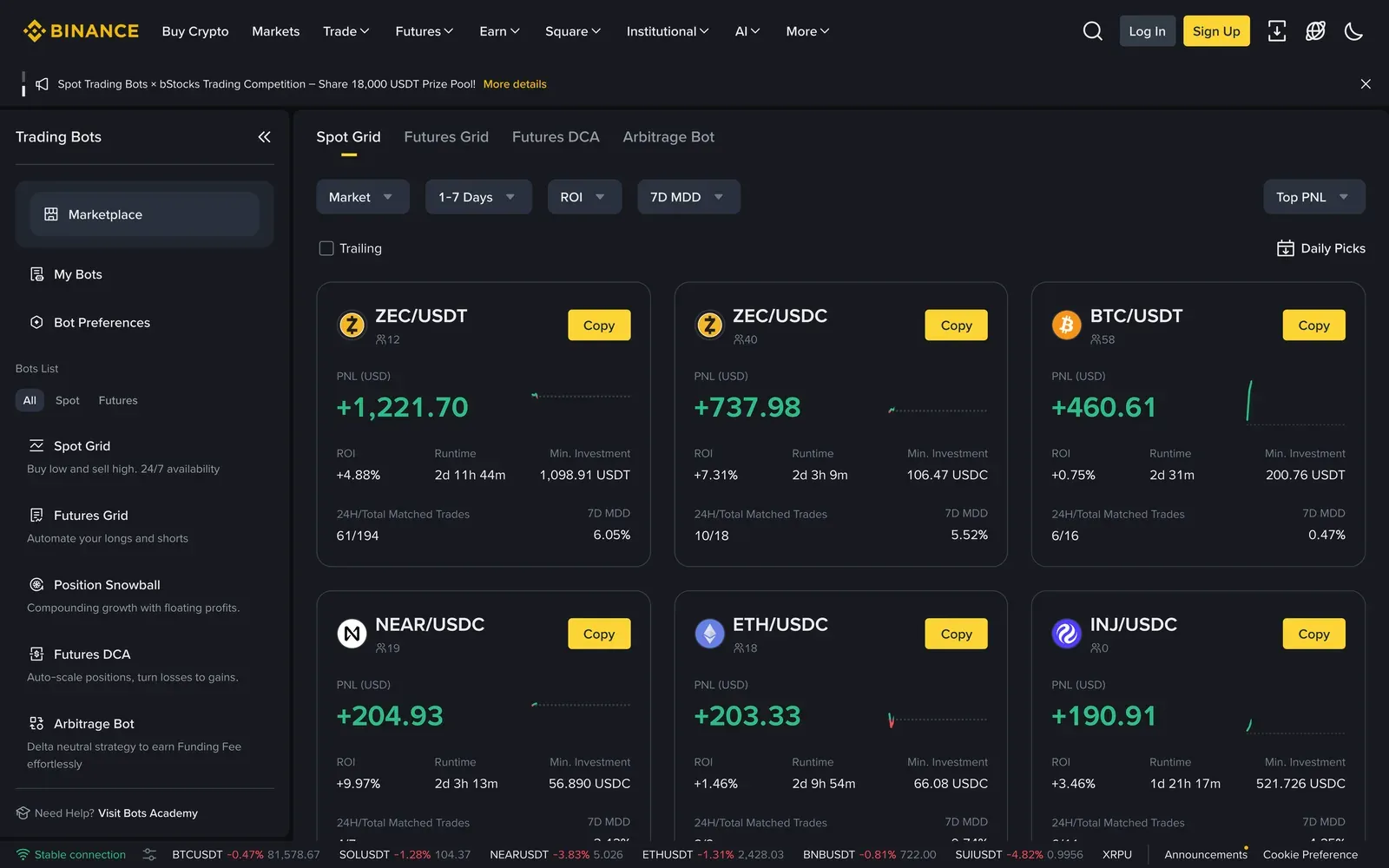
What it offers. The marketplace lists Spot Grid, Futures Grid, Futures DCA, Position Snowball and an Arbitrage Bot, along with bots you can copy from other users. Spot and futures markets, a deep order book and a large number of listed assets.
Fees. Spot trading starts at 0.100% maker and 0.100% taker at the base tier, falling with 30-day volume and BNB fee discounts. Checked on the Binance fee schedule, 17 October 2026.
Material limitations. Everything stops at Binance. No view of balances held elsewhere, no journaling across venues, and the copy-bot listings display other traders' returns, which are not a forecast of yours. Regional availability varies.
Best suited for: traders who concentrate on Binance and want automation without paying for separate software.
5. Kraken: best for a professional order ticket
Kraken Pro is a capable trading interface in its own right, and Kraken is the venue in this list most often chosen for its funding options and regulatory posture.
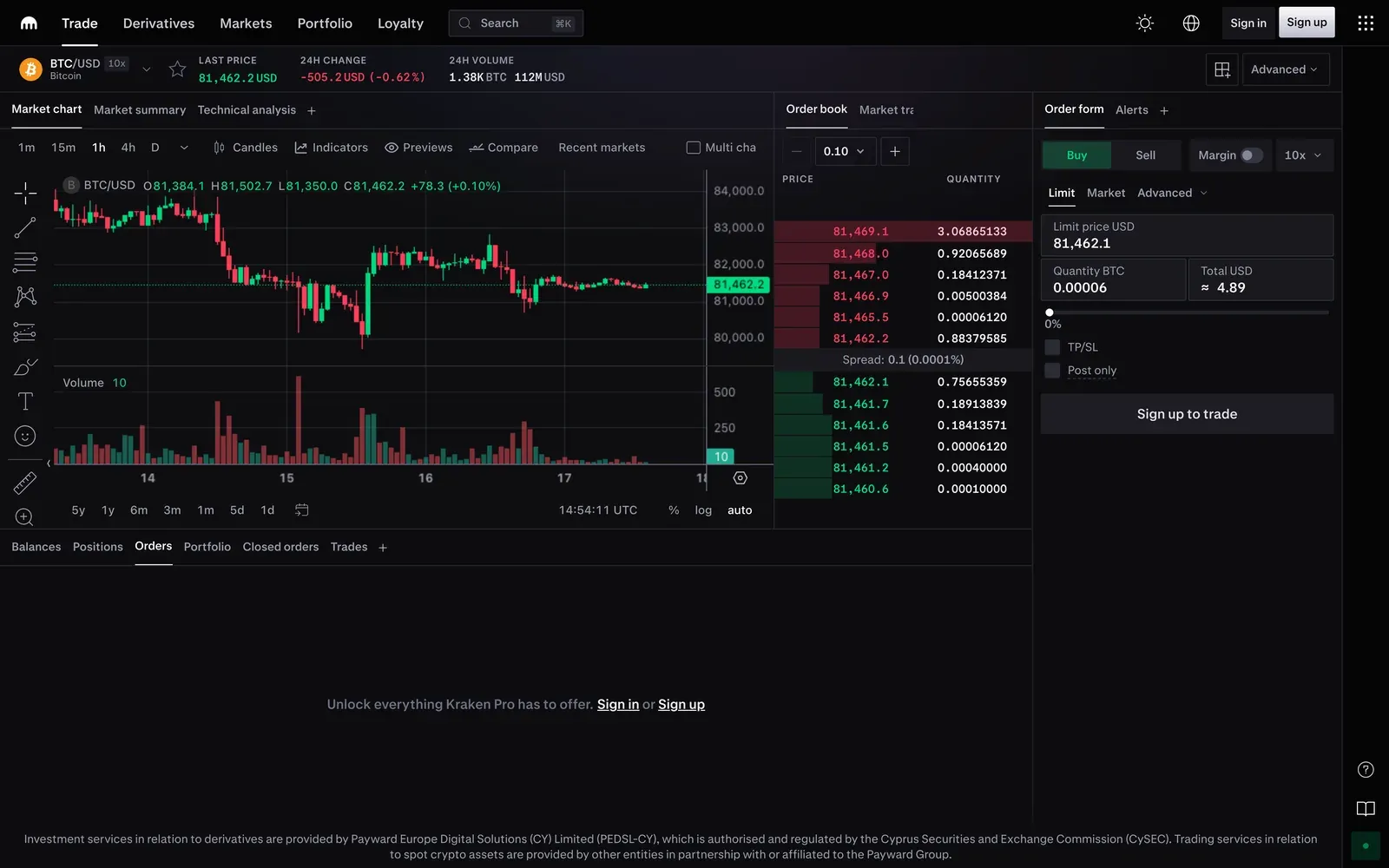
What it offers. A single-screen layout with chart, order book, market trades and an order form carrying limit, market and advanced order types, plus margin and a separate derivatives and perpetuals product.
Fees. A tiered maker-taker schedule, with cross-platform fee tiers that pool your activity across Kraken products. See Kraken's fee schedule for the current bands.
Automation. No built-in bot marketplace comparable to Binance's. Automation is generally done through the API or third-party software.
Material limitations. Kraken only, and without native bots you will be bringing your own automation.
Best suited for: traders who want a solid manual trading interface on a long-established venue.
6. KuCoin: best for breadth of listed markets
KuCoin lists a very wide range of assets, including small-cap tokens that take longer to reach other venues, and it builds bot controls directly into the order panel.
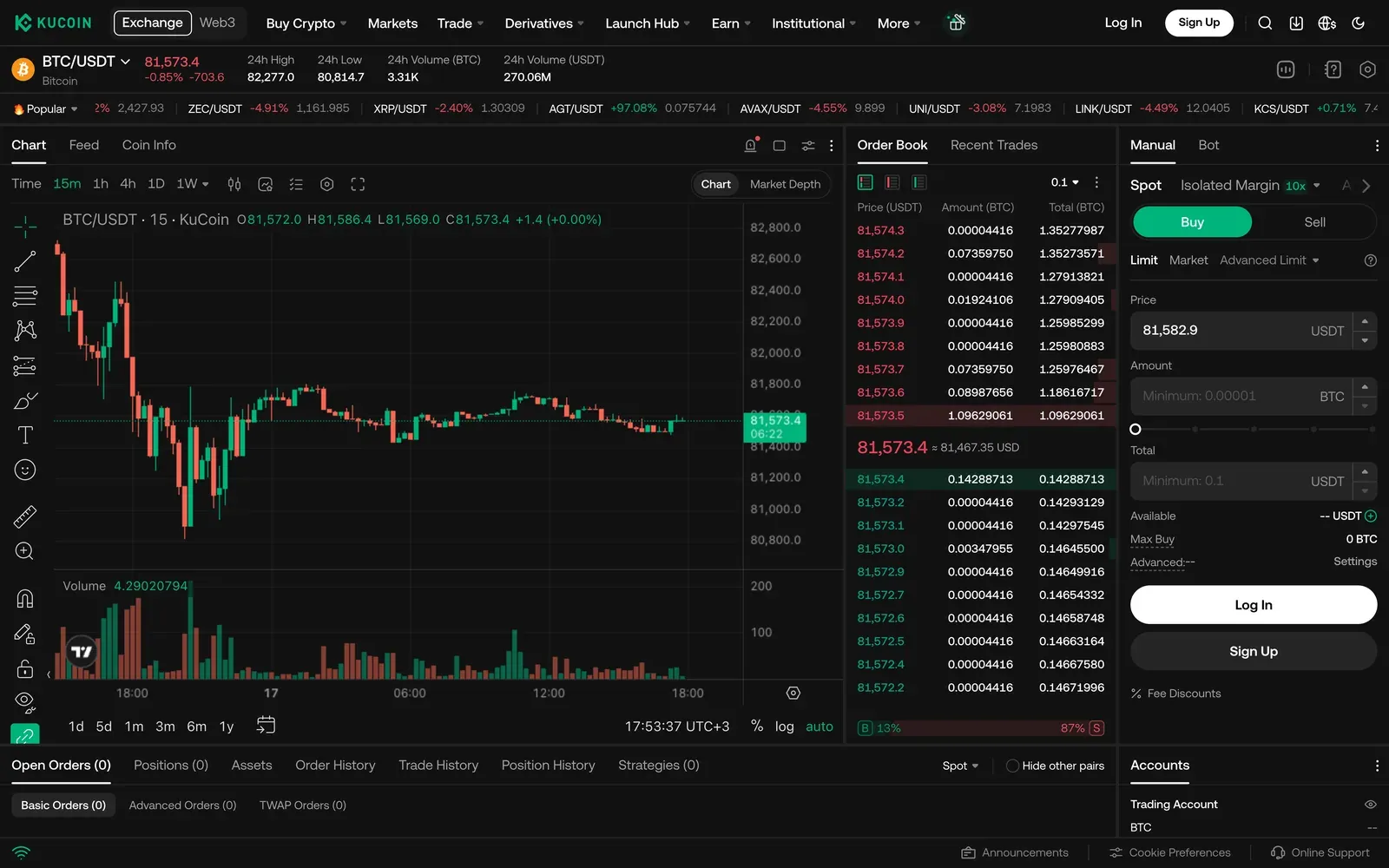
What it offers. Spot, margin and futures, a large listing roster, and a Bot tab alongside manual order entry so automation sits where you trade rather than in a separate section.
Fees. A tiered VIP schedule by 30-day volume and holdings. See KuCoin's VIP level page for current rates.
Material limitations. KuCoin only. Breadth of listings cuts both ways: thin markets carry wider spreads, which matters for grid strategies in particular.
Best suited for: traders who want access to a long tail of tokens with automation available in the same screen.
7. Coinbase Advanced: best for traders who want a regulated US on-ramp
Coinbase Advanced is the trading interface inside Coinbase, giving order book trading and lower fees than the simple buy and sell flow.
What it offers. Limit and market orders against a live order book, charting, and the same account and custody arrangements as the rest of Coinbase, which is the main reason people choose it.
Fees. A tiered maker-taker schedule that improves with 30-day volume, and materially lower than the simple Coinbase flow. See Coinbase's Advanced Trade fee page for current tiers.
Automation. Not a bot platform. Automation is via the API or third-party software.
Material limitations. Coinbase only, a narrower market list than Binance or KuCoin, and no native automation. We were unable to capture a current screenshot of the interface because the page is behind bot protection, so this entry is documentation-based only.
Best suited for: traders who already keep funds at Coinbase and want better pricing than the simple buy screen.
8. Poloniex: best for margin on a long-running venue
Poloniex is one of the older exchanges still operating, with spot and margin trading in a single screen.
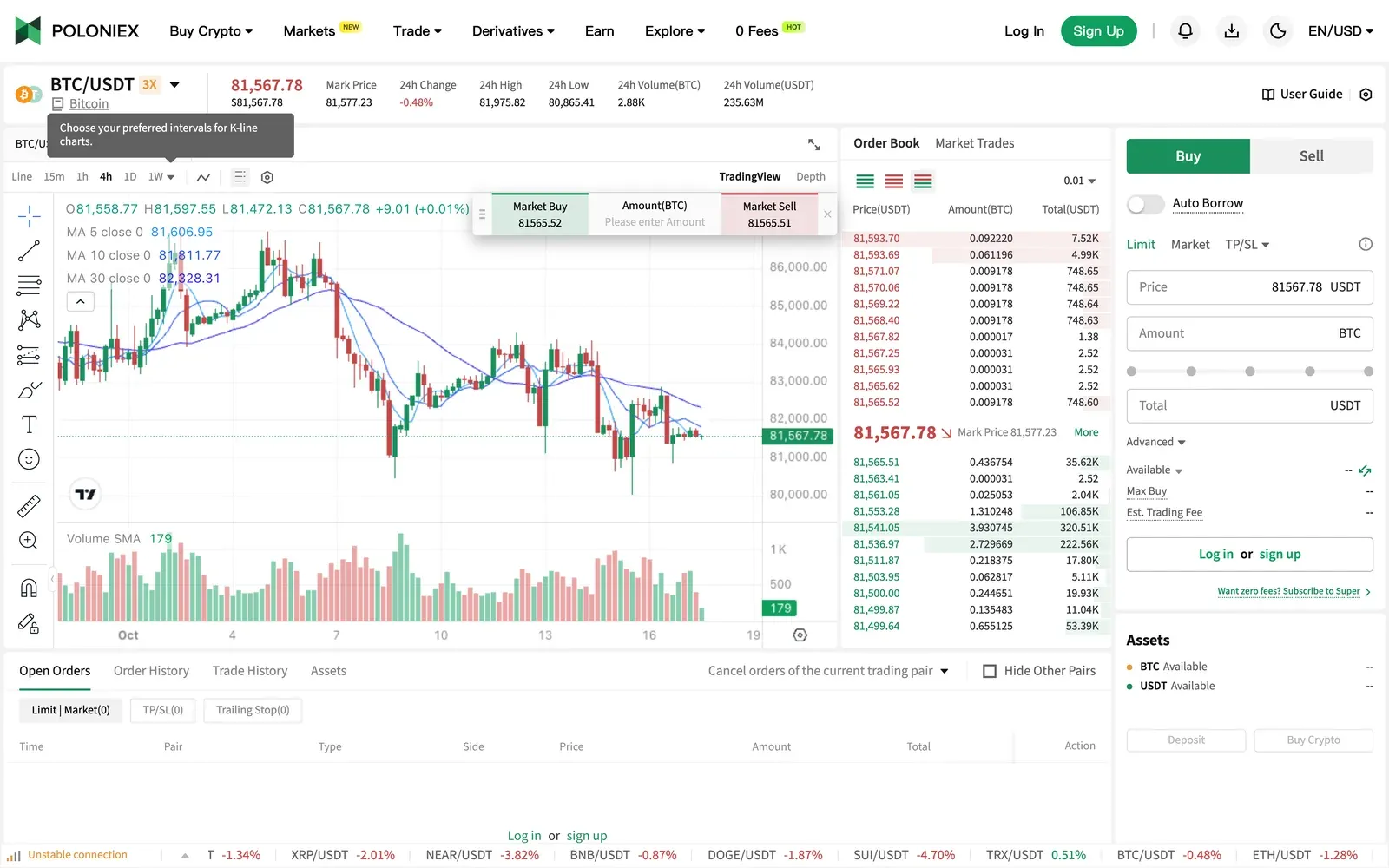
What it offers. Spot and margin trading with an auto-borrow toggle in the order form, futures, and an assets panel showing margin ratio and borrowing alongside the book.
Fees. A tiered VIP schedule; the published table runs from the base tier down to roughly 0.00%/0.10% maker-taker at the highest volumes. See the Poloniex fee schedule for the band that applies to you.
Material limitations. Poloniex only, and liquidity varies considerably by market. Margin magnifies losses as well as gains.
Best suited for: traders who want margin on a venue they already use.
Side-by-Side Comparison
Scroll the table sideways to see every tool. "Not stated" means the vendor's public pages do not say, not that the feature is absent.
| Criterion | Altrady | Coinigy | TradingView | Binance | Kraken | KuCoin | Coinbase Advanced | Poloniex |
|---|---|---|---|---|---|---|---|---|
| Type | Trading software over your exchange accounts | Trading software, dashboard-led | Charting and scripting | Exchange | Exchange | Exchange | Exchange | Exchange |
| Best fit | Running several exchanges from one workspace | One dashboard over many accounts | Analysis, scripting and alerts | Exchange-native bots | Professional order ticket | Breadth of listed markets | Regulated US on-ramp | Margin on an older venue |
| Exchange coverage | 19+ connected exchanges | 39 exchanges stated | Not an execution layer for crypto | Binance only | Kraken only | KuCoin only | Coinbase only | Poloniex only |
| Portfolio across accounts | Yes, every connected account | Yes, 24/7 monitoring | No | No | No | No | No | No |
| Scanning | TA, base, quick scanners and market explorer | Not stated | Screeners across assets | Exchange screeners | Not stated | Exchange screeners | Not stated | Not stated |
| Automation | Six bots: grid and HODL (spot only), DCA, TradingView, signal, webhook. 2 to 50 at once by plan | Not stated | Alerts only; drives other software | Spot grid, futures grid, futures DCA, arbitrage, copy bots | Not stated; API | Bot tab in the order panel | Not stated; API | Not stated; API |
| Backtesting | Yes. Free tier 2 a month on 7 days of data; add-on for unlimited | Not stated | Strategy tester | Bot backtests in-product | Not stated | Not stated | Not stated | Not stated |
| Trading journal | Yes, on Essential and Premium | Not stated | No | Trade history only | Trade history only | Trade history only | Trade history only | Trade history only |
| Custody | Non-custodial; API keys without withdrawal permission | Connects by API key | Not applicable | Holds your funds | Holds your funds | Holds your funds | Holds your funds | Holds your funds |
| Free access | FREE plan with paper trading, plus a 5-day full trial, no card | Starter free, 7-day trial | Free tier available | Free to use; you pay trading fees | Free to use; you pay trading fees | Free to use; you pay trading fees | Free to use; you pay trading fees | Free to use; you pay trading fees |
| Price | Basic EUR 28, Essential EUR 50, Premium EUR 90 a month; EUR 20/35/63 on annual | Pro Trader USD 18.66, API Dev Pro USD 99.99 a month | Essential EUR 12.95 to Ultimate EUR 199.95 a month, annual billing | Spot from 0.100%/0.100% | Tiered maker-taker | Tiered VIP schedule | Tiered maker-taker | Tiered VIP schedule |
Which Crypto Trading Software Fits Your Workflow?
| If your priority is | Consider | The trade-off |
|---|---|---|
| Trading several exchanges at once | Altrady, then Coinigy | Altrady gives one workspace for scanning, orders, automation and journaling across 19+ venues. Coinigy states broader exchange coverage but is dashboard-led, with automation not stated |
| Automating entries and exits | Altrady, then Binance or KuCoin | Altrady gives you six bots separated by trigger, running across your connected exchanges rather than one venue; the Grid Bot and HODL Bot are spot-only. Exchange-native bots cost nothing extra but stop at that exchange |
| Reviewing how you actually traded | Altrady | The journal measures adherence to your own checklist and risk profile, not just profit and loss. It needs Essential or above; everywhere else you are exporting trade history into a spreadsheet |
| Analysis and custom scripting | TradingView, with Altrady for execution | TradingView has the deepest charting, scripting and script library. It does not connect your accounts, so pair it with software that executes: its webhook alerts can drive Altrady's signal bot |
| Testing an idea before risking money | Altrady | Paper trading on the free plan, and backtesting at two runs a month on seven days of data unless you add Backtesting Pro. Results are simulated and past performance does not guarantee future results |
| Trading on one exchange only | That exchange's own tools | Free with the account and well integrated. You give up the cross-exchange portfolio, cross-venue scanning and journaling that software adds, which only matters once you use more than one venue |
| Lowest total cost | Exchange-native tools | No subscription at all; you pay trading fees either way. Software is worth it when it saves you more in missed setups, manual errors or untracked mistakes than it costs |
How to Test Crypto Trading Software Before You Commit
A proposed evaluation workflow, not a test we have run for you. An afternoon is usually enough to decide.
- List the exchanges you actually use and confirm each one is supported, for the market type you trade. Spot support does not imply futures support.
- Connect one account read-only first where the tool allows it, and confirm balances and history appear correctly before you give it trading permission.
- Check the API permissions it asks for. Trading software should never need withdrawal rights. If it asks, stop.
- Place one small real order through the software, with a take profit and stop loss attached, and confirm it behaves on the exchange exactly as the interface says.
- Run one automation on a small size. Understand what triggers it, what happens when price leaves its range, and what happens if your subscription lapses.
- Recreate a week of trades in the journal and see whether the output tells you something you did not already know.
- Add up the real cost. Subscription plus any add-on you actually need, on the billing basis you will pay, on top of your exchange trading fees.
Frequently Asked Questions
What is the best crypto trading software in 2026?
For traders running more than one exchange, we recommend Altrady: it connects 19+ exchanges in one workspace and adds scanning, automation, journaling and a portfolio across every connected account. If you trade on a single venue and only want automation there, that exchange's own bots may be enough. If your bottleneck is analysis rather than execution, TradingView is the stronger tool.
What is the difference between crypto trading software and a crypto exchange?
An exchange holds your funds and matches your orders. Trading software connects to the exchange accounts you already have, usually by API key, and adds tooling the exchange does not provide, such as scanning across venues, automation that follows your own rules, journaling and a combined portfolio. You need an exchange; software is optional and sits on top.
Do I need trading software, or can I just trade on the exchange?
You can trade perfectly well on an exchange alone, and if you use one venue and trade occasionally that is usually the right answer. Software starts paying for itself when you hold balances on several exchanges, want automation that spans them, or want an honest record of how you traded rather than a list of fills.
Is crypto trading software safe to use?
The important question is what permissions it asks for. Altrady connects through API keys created without withdrawal permission, so it can place and manage orders but cannot move funds off the exchange. Any tool that asks for withdrawal rights deserves a very hard look, and exchange-side protections such as IP allowlisting are worth enabling regardless.
How much does crypto trading software cost?
Altrady is EUR 28, EUR 50 or EUR 90 a month on monthly billing, or EUR 20, EUR 35 and EUR 63 a month on annual billing. Coinigy's Pro Trader is USD 18.66 a month. TradingView runs from EUR 12.95 to EUR 199.95 a month on annual billing. Exchange-native tools cost nothing beyond the trading fees you already pay. All checked 17 October 2026.
Can I connect multiple crypto exchanges to one platform?
Yes, that is the main reason to use trading software at all. Altrady connects 19+ exchanges, with the number of trading accounts set by your plan: 5 on Basic, 15 on Essential and 30 on Premium. Coinigy states coverage of 39 exchanges. Exchange-native tools, by definition, only see their own venue.
Can beginners use crypto trading software?
Yes, and paper trading is the sensible place to start. Altrady's free plan includes paper trading with no real money at risk, and it keeps working even if a paid subscription later lapses. Learn the order types and one automation engine before you add more.
How do trading bots actually work?
It depends entirely on what triggers them. Altrady runs six: a Grid Bot works a price range you set and does not predict direction; a DCA Bot enters and then builds the position through a safety-order ladder; a HODL Bot buys on a schedule to accumulate; a TradingView Bot acts on your TradingView strategy alerts; a Signal Bot acts on the Crypto Base Scanner or a supported provider; and a Webhook Bot acts on instructions from your own system. They suit different markets, and none of them removes risk.
Are there risks to using crypto trading bots?
Yes. A Grid Bot stops working as intended when price leaves its range. A DCA Bot only deploys its full ladder if the market keeps moving against you. Automation also keeps running when you are not watching, which is the point and also the risk. Size positions as though the automation will be wrong, and remember that backtests and paper results are simulated: past performance does not guarantee future results.
Which crypto trading platform has the lowest fees?
Exchange fees are tiered by 30-day volume, so the answer depends on how much you trade. Binance starts at 0.100% maker and taker at the base tier; Kraken, KuCoin, Coinbase Advanced and Poloniex all publish tiered maker-taker schedules that improve with volume. Software subscriptions sit on top of whichever exchange fees you pay, so compare the total rather than either number alone.
Try Altrady
Connect your exchanges and run scanning, smart orders, automation and your trading journal from one workspace.
5 days free, no credit card required.