
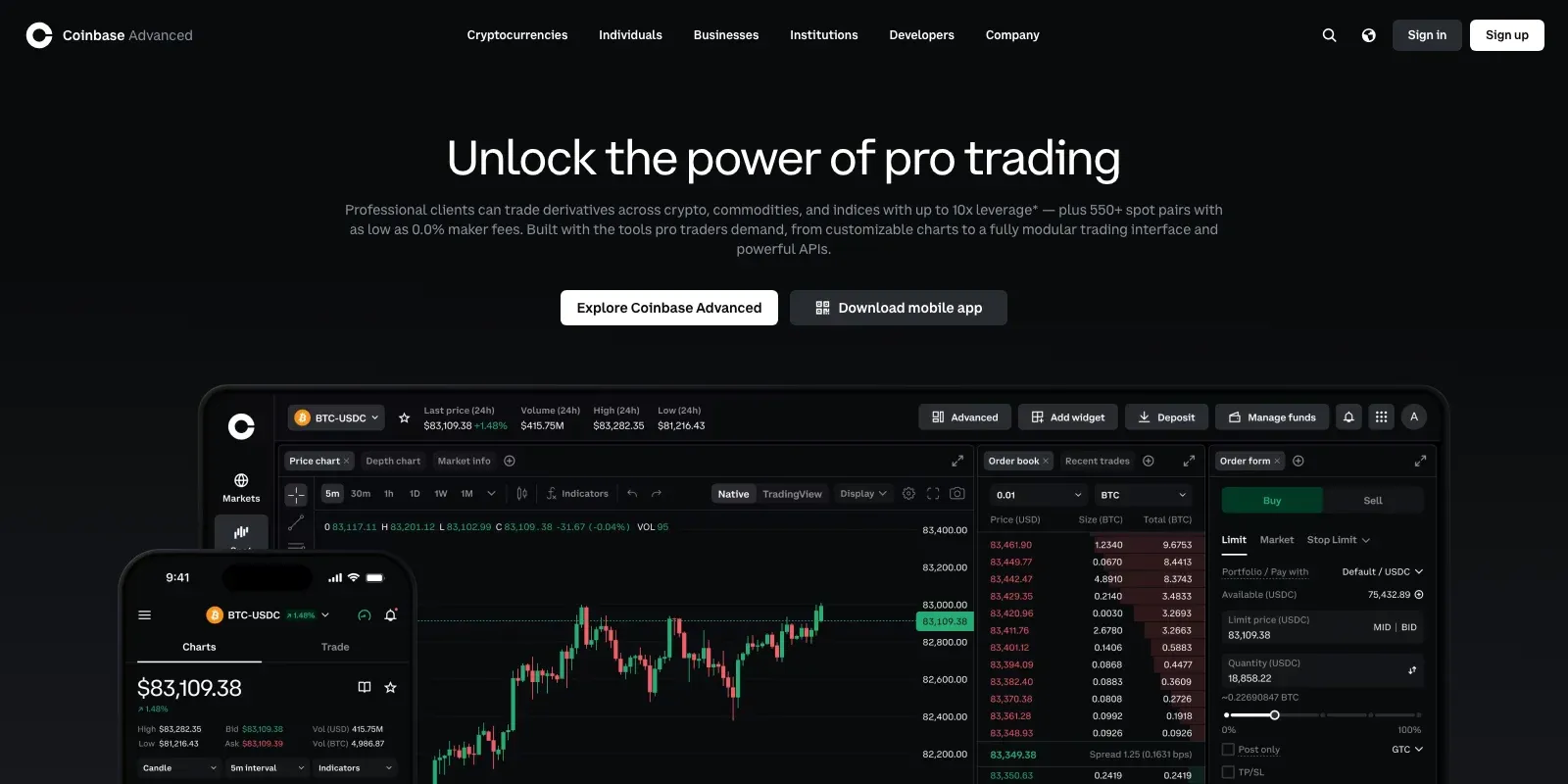
Coinbase Advanced, still often called Coinbase Advanced Trade, is Coinbase's free trading interface for experienced traders. It replaces Coinbase Pro and lets you trade directly on the order book with limit, stop and bracket orders, TradingView-powered charts and maker-taker fees instead of the spread built into simple Coinbase prices.
This guide explains how Coinbase Advanced differs from the standard Coinbase app, what it costs after the fee changes of 16 September 2026, how to use it step by step, what its API offers, and how to trade your Coinbase account with extra tools such as bots, smart orders and paper trading in Altrady. Fees and features were checked on Coinbase's own pages on 21 October 2026. Nothing here is financial advice.
Key Takeaways
- It is free to use. Coinbase Advanced has no subscription fee; you pay maker and taker fees on each trade.
- Fees fell in September 2026. US accounts start at 0.50% maker and 0.90% taker, and the first discount tier now begins at $10,000 of monthly volume instead of $25,000.
- Limit orders cost less than simple Coinbase. Simple Coinbase prices include a spread, and its limit orders carry a 1% execution fee.
- It has no bots or paper trading of its own. Coinbase lists third-party platforms, including Altrady, in its Advanced Trade Developer Program for automation.
- Fees depend on your region. EU and UK accounts start at 0.25% maker and 0.50% taker, and some international markets lower still.
What Is Coinbase Advanced?
Coinbase describes Advanced as "our advanced trading platform, intended for a more experienced trader". It uses your normal Coinbase account, balances and history, so there is nothing to transfer. Coinbase Pro was shut down and all users were moved to Advanced by 1 December 2023, which is why many traders still search for "Coinbase Advanced Trade" or "Coinbase Pro".
Coinbase vs Coinbase Advanced
| Simple Coinbase | Coinbase Advanced | |
|---|---|---|
| Best for | Quick buys and sells | Active trading with order types and charts |
| Pricing | Quoted price includes fees and a spread | Maker and taker fees on the order book, no spread added |
| Limit orders | 1% limit order execution fee | Maker fee from 0.50% (US entry tier) |
| Order types | Buy, sell, limit | Market, limit, TWAP, stop-limit, bracket, take profit and stop loss |
| Charts | Basic price chart | Interactive charts powered by TradingView |
| Cost to use | Free | Free, no subscription |
Both use the same account. You switch between them with the Advanced toggle on the website or in the Coinbase app.
Coinbase Advanced Trade Fees in 2026
Coinbase Advanced charges a maker fee when your order adds liquidity to the order book (usually a limit order that does not fill straight away) and a taker fee when it fills against an existing order (a market order, for example). Your tier depends on your 30-day trading volume, or on your USDC balance, whichever gives the better rate.
| Tier | 30-day spot volume | Maker | Taker |
|---|---|---|---|
| Intro | $0 | 0.50% | 0.90% |
| Advanced 1 | $10K | 0.35% | 0.75% |
| Advanced 2 | $50K | 0.15% | 0.30% |
| Advanced 3 | $250K | 0.10% | 0.15% |
| VIP 1 | $1M | 0.06% | 0.10% |
| VIP 2 | $5M | 0.04% | 0.06% |
| VIP 3 | $20M | 0.01% | 0.05% |
| VIP 4 to VIP 8 | $50M to $1B | 0% | 0.04% to 0.02% |
US rates from Coinbase's VIP fee table, checked on 21 October 2026. Coinbase lists lower entry rates in other regions: 0.25% maker and 0.50% taker in the EU and UK, and 0.09% and 0.10% in some international markets. Stable pairs have their own fee schedule.
What a trade costs: an example
On the US Intro tier, a $1,000 market buy pays the 0.90% taker fee, or $9. The same $1,000 placed as a limit order that rests on the book and fills later pays the 0.50% maker fee, or $5. Once your 30-day volume passes $10,000, the same trades cost $7.50 and $3.50.
What changed in September 2026
On 16 September 2026 Coinbase restructured the Advanced tiers. Discounts now start at $10,000 of monthly volume instead of $25,000, and spot and derivatives volume both count toward your tier. If you read an older guide quoting a 0.60% maker and 1.20% taker entry fee, it describes the previous schedule.
Does Coinbase One make Advanced free?
No. Coinbase One's zero-fee benefit excludes Coinbase Advanced. Depending on the plan, Coinbase One gives no rebate (Basic), up to $100 a month in rebates (Preferred) or unlimited rebates (Premium) on Advanced spot fees.
How to Use Coinbase Advanced
- Open Advanced. Sign in to Coinbase on the web and switch on the Advanced toggle, or open it from the menu in the Coinbase app.
- Choose a market. Search for a trading pair such as BTC-USD or ETH-USDC.
- Read the order book and chart. The order book shows resting buy and sell orders; the TradingView-powered chart shows price history and indicators.
- Pick an order type. Use a limit order to set your price and usually pay the lower maker fee, or a market order to fill straight away at the taker fee.
- Add protection. On the web you can attach a take profit and stop loss to the order, or use a bracket or stop-limit order.
- Review and place the order. Check the estimated fee before confirming, then track the order under open orders.
Order types on Coinbase Advanced
- Market, limit and TWAP on web and mobile. TWAP splits a large order into smaller ones over time.
- Stop-limit and bracket orders on the web only.
- Take profit and stop loss attached to a main order, on the web.
- Time in force: good till cancelled, good till time, good till date and immediate or cancel.
Coinbase Advanced Perpetual Futures
In the US, Coinbase offers CFTC-regulated perpetual-style futures through Coinbase Financial Markets, launched in July 2025 with nano Bitcoin and Ether contracts. Coinbase states leverage of up to 10x intraday for crypto, hourly funding, and fees from 0.02% per contract with a $0.15 minimum. Outside the US, Coinbase's global derivatives moved to a Deribit-powered service on 1 October 2026. Availability depends on where you live, and leverage increases both gains and losses.
Coinbase Advanced Trade API
The Advanced Trade API gives programmatic access to orders, accounts and market data over REST, plus live data over WebSocket, with one API key for both and an official Python SDK. Each key can have view, trade and transfer permissions and is scoped to a portfolio. Old Coinbase Pro keys no longer work, so you need to create new ones.
For third-party trading platforms, create a key with view and trade permissions only. No trading platform needs the transfer permission, which allows deposits and withdrawals.
What Coinbase Advanced Does Not Do
- No trading bots. Coinbase does not offer built-in grid, DCA or signal bots for Advanced.
- No paper trading. Coinbase does not list a practice or demo mode for Advanced.
- Some orders are web-only. Stop-limit and bracket orders are not available in the app.
- Entry fees are high in the US. 0.90% taker on the Intro tier is well above the entry fees of many large exchanges.
Trade Coinbase Advanced With Altrady
Altrady is listed by Coinbase in its Advanced Trade Developer Program. You connect your Coinbase account to Altrady with API keys and keep your funds on Coinbase: Altrady never holds your assets, and trading only needs view and trade permissions, so withdrawals stay switched off.
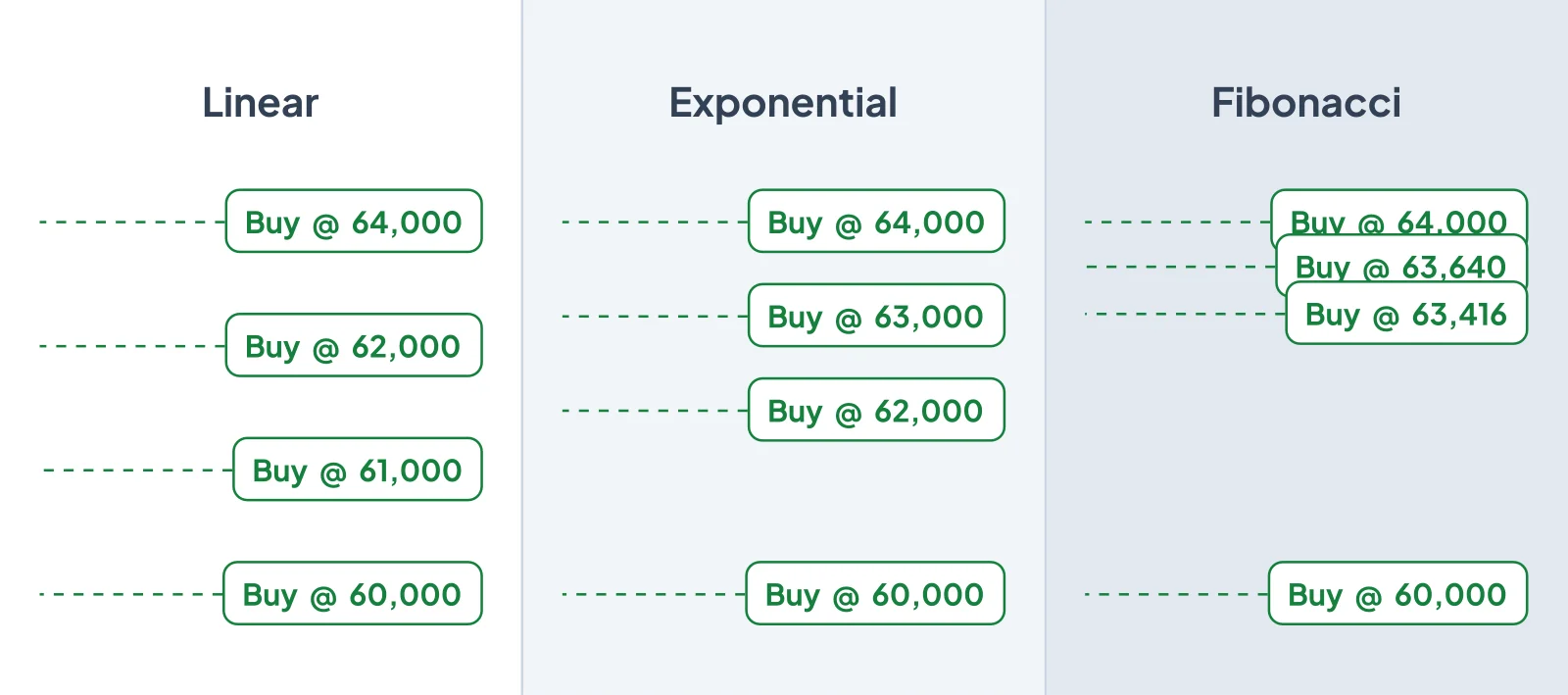
- Smart orders: set the entry, stop loss and several take-profit targets in one form, with break-even protection that moves the stop to your entry after the first target. See trading Coinbase with Altrady.
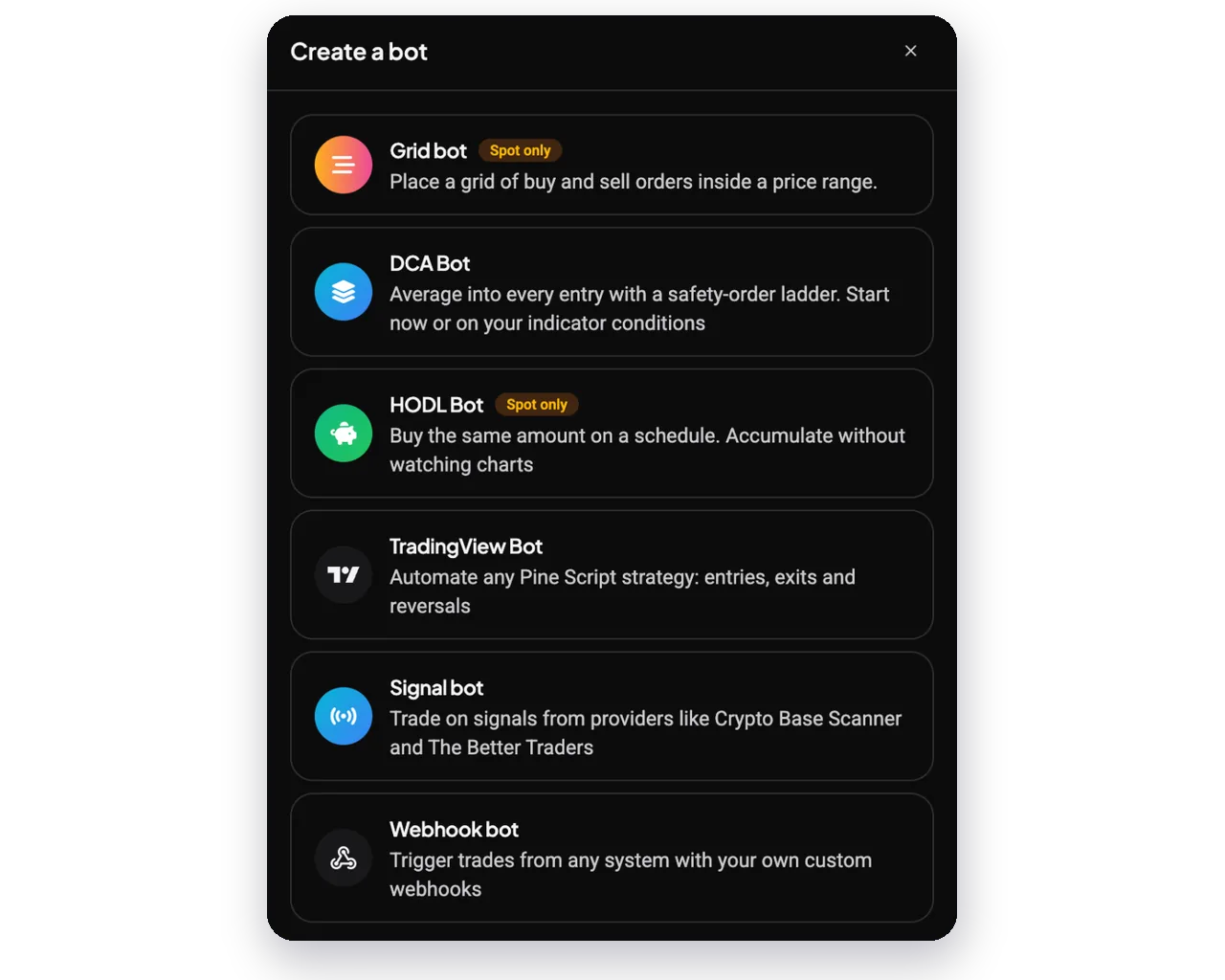
- Trading bots: run Grid, DCA, HODL, TradingView, Signal and Webhook bots on Coinbase spot markets. See the Coinbase trading bot page.
- Your own signals: build rules from 100+ indicators in the TA Scanner and let a DCA Bot trade them on Coinbase.
- Paper trading: practise orders and bots on a paper account before using real funds, which Coinbase does not offer.
- Several exchanges in one place: trade Coinbase next to other connected exchanges and track positions and PnL together.
Altrady supports Coinbase spot markets. Coinbase's trading fees still apply to every order, and Altrady plans start after a 5-day free trial.
How to connect Coinbase Advanced to Altrady
- In Coinbase, create a new Advanced Trade API key with view and trade permissions, and leave transfer switched off.
- In Altrady, add Coinbase as an exchange account and paste the key details.
- Check that your balances appear, then place a small order or start on a paper account.
Frequently Asked Questions
Is Coinbase Advanced free?
Yes, there is no subscription fee to use Coinbase Advanced. You pay maker and taker fees on each trade, starting at 0.50% maker and 0.90% taker for US accounts on the Intro tier, and lower in the EU, UK and some other regions.
What are the Coinbase Advanced Trade fees?
Fees depend on your 30-day trading volume. For US accounts they start at 0.50% maker and 0.90% taker, drop to 0.35% and 0.75% from $10,000 of monthly volume, and reach 0% maker at $50 million. Coinbase changed these tiers on 16 September 2026.
What is the difference between Coinbase and Coinbase Advanced?
Simple Coinbase shows a quoted price that includes fees and a spread, while Coinbase Advanced lets you trade on the order book with maker and taker fees and more order types. Both use the same account, and you switch with the Advanced toggle.
Is Coinbase Advanced the same as Coinbase Pro?
Coinbase Advanced replaced Coinbase Pro. Coinbase Pro was shut down, all users were moved to Advanced by 1 December 2023, and old Pro API keys no longer work.
Is Coinbase Advanced cheaper than Coinbase?
Usually, yes. Simple Coinbase prices include a spread and its limit orders carry a 1% fee, while a limit order on Coinbase Advanced pays a maker fee from 0.50% for US accounts, falling as your volume grows.
Can you use a trading bot on Coinbase Advanced?
Coinbase has no built-in bots for Advanced, but you can connect third-party platforms with an API key. Altrady, which Coinbase lists in its Advanced Trade Developer Program, runs Grid, DCA, HODL, TradingView, Signal and Webhook bots on Coinbase spot markets.
Does Coinbase Advanced have paper trading?
Coinbase does not list a paper trading or demo mode for Advanced. You can practise Coinbase trades and bots on a paper account in Altrady before using real funds.
Does Coinbase Advanced offer futures?
Yes, in eligible regions. US customers can trade CFTC-regulated perpetual-style futures through Coinbase Financial Markets with up to 10x intraday leverage on crypto, and customers outside the US use Coinbase's Deribit-powered global derivatives.
Risk Disclaimer
Trading cryptocurrencies, and especially leveraged products, carries a high risk of loss. Fees and product availability change and differ by region; check Coinbase's current fee page before trading.