
A liquidation map is a chart that shows the price levels where leveraged long and short futures positions would be forcibly closed, and roughly how much position value sits at each level. Long liquidations sit below the current price, short liquidations above it. Most maps estimate these levels; a few, built on public on-chain positions, show them exactly.
Traders use liquidation maps to see where forced buying or selling could speed up a move, and to avoid placing stops inside crowded zones. Altrady shows estimated liquidation levels directly on its trading charts, so you can see them next to your own entries, take-profits and stops and act on them from the same screen. This guide explains what the map shows, how it is calculated, how to read one using a real example from 21 October 2026, how to use liquidation levels in Altrady, the difference between a liquidation map and a liquidation heatmap, which tools offer them, and the mistakes to avoid. It describes how traders read the chart and is not trading advice.
Key Takeaways
- Longs below, shorts above. Each bar shows how much leveraged position value would be liquidated at that price, and the cumulative lines show how much would be closed if price moved that far.
- Most maps are estimates. Tools model liquidation levels from open interest, trades and assumed leverage. Maps built on Hyperliquid's public positions are the exception.
- A cluster is not a price target. CoinGlass's own research says a liquidation level is reached about as often as a random price the same distance away. Treat clusters as a risk map.
- Map and heatmap answer different questions. A map shows open levels by price right now; a heatmap shows how estimated levels built up over time.
- See liquidation levels where you trade. Altrady's Liquidations indicator draws estimated 5x to 100x liquidation levels on the chart in your trading terminal, next to your positions, TP and SL.
- The most practical use is defensive. Check the map before setting a stop or choosing leverage, so your own position is not part of the next cascade.
What Is a Liquidation Map?
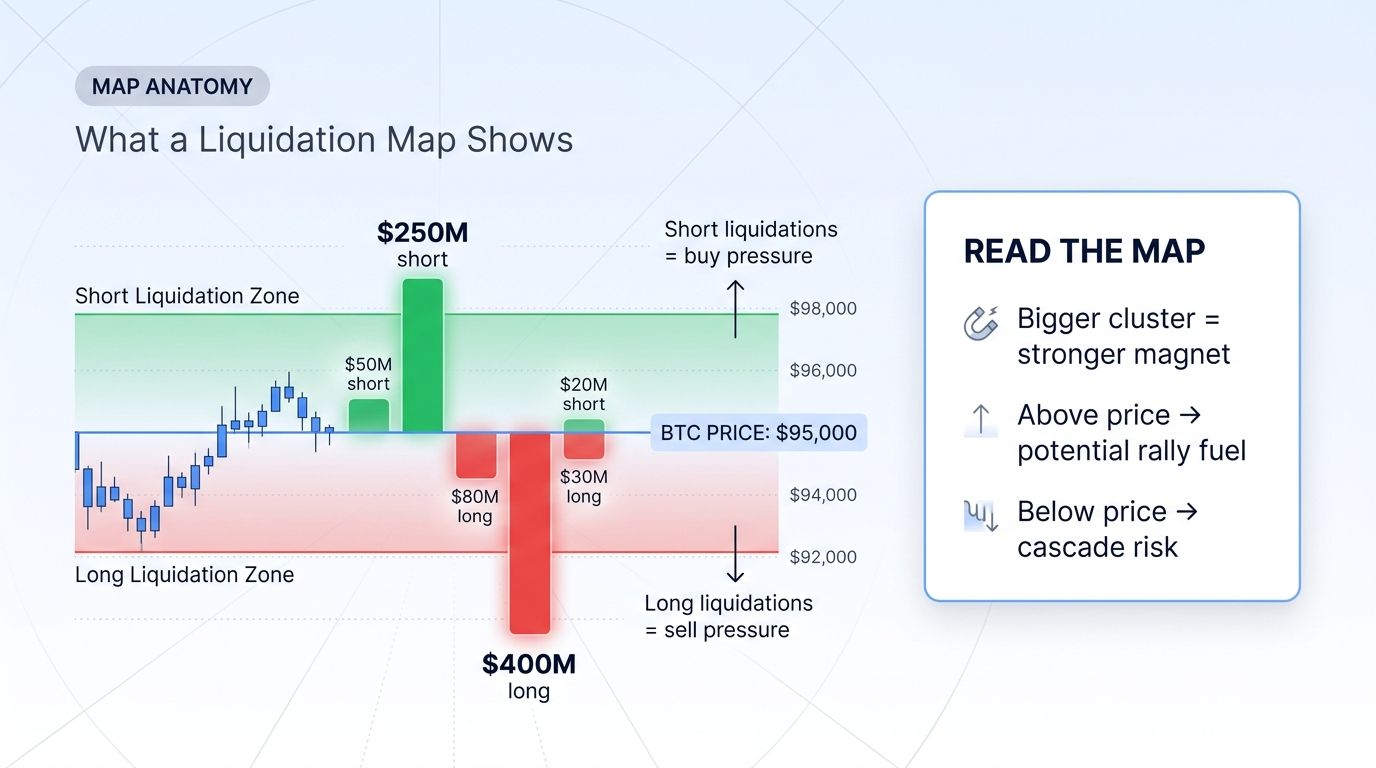
When you open a leveraged futures position, the exchange sets a liquidation price based on your entry, leverage and margin. If the market reaches it, the exchange closes your position at market. A liquidation map adds up those liquidation prices across many traders and plots them by price level.
Liquidating a long means the exchange sells, and liquidating a short means it buys. So a large group of long liquidations below price is a level where forced selling could add to a fall, and a large group of short liquidations above price is where forced buying could add to a rise. When one liquidation pushes price into the next group, the result is a liquidation cascade.
How to Read a Liquidation Map: A Real Example
Here is CoinMarketCap's Bitcoin liquidation map on the morning of 21 October 2026. It uses Hyperliquid data only, which is why CoinMarketCap labels it "Exact".
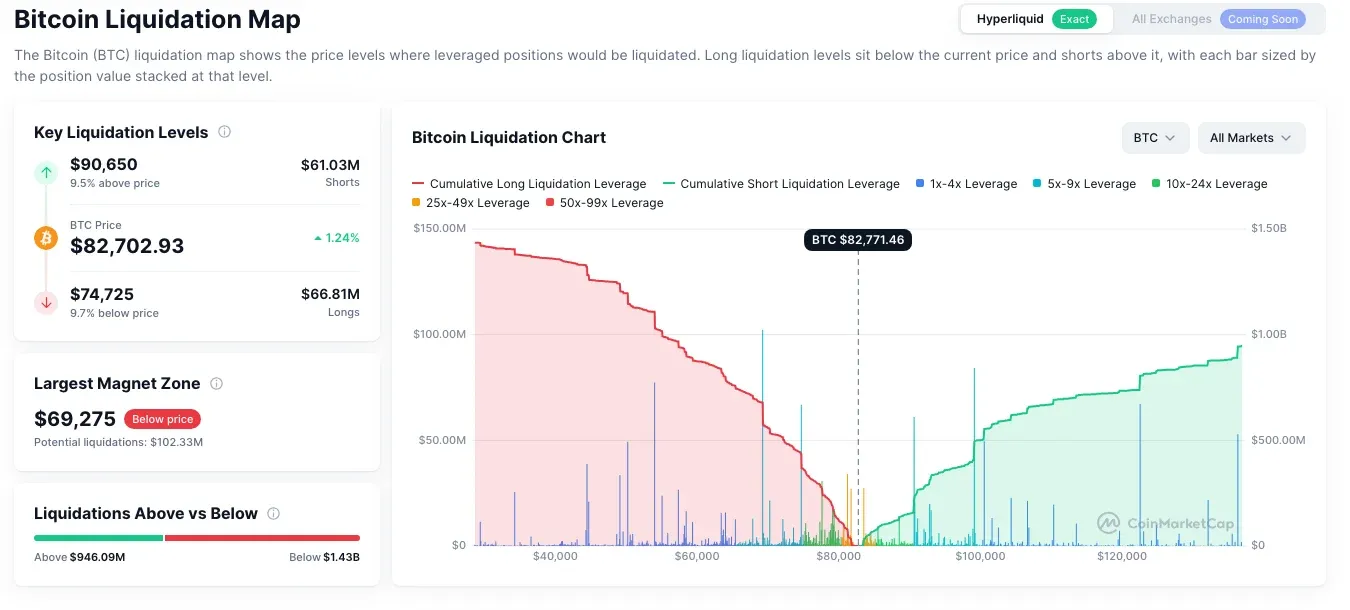
- Find the current price. The dashed vertical line marks BTC at about $82,700. Everything to the left is a long liquidation level, everything to the right a short one.
- Read the bars. Each bar is the position value that would be liquidated at that price, coloured by leverage band from 1–4x up to 50–99x. Tall bars close to price are positions that a small move would close.
- Read the cumulative lines. The red line shows the total long liquidations you would trigger by moving down to each price, and the green line the total short liquidations by moving up. Here about $1.43 billion of longs sat below price and $946 million of shorts above it.
- Look for the largest cluster. CoinMarketCap highlighted $69,275, about 16% below price, as the largest zone, with about $102 million of potential liquidations.
- Note the nearest big levels. The key levels shown were $90,650 above price ($61 million of shorts, 9.5% away) and $74,725 below ($67 million of longs, 9.7% away).
What this does and does not tell you: more liquidation value sat below price than above, so a sharp fall would have met more forced selling than a sharp rise would meet forced buying. It does not say price will fall, and it covers only one venue. The same chart for an aggregated set of exchanges would look different.
Liquidation Map in Altrady
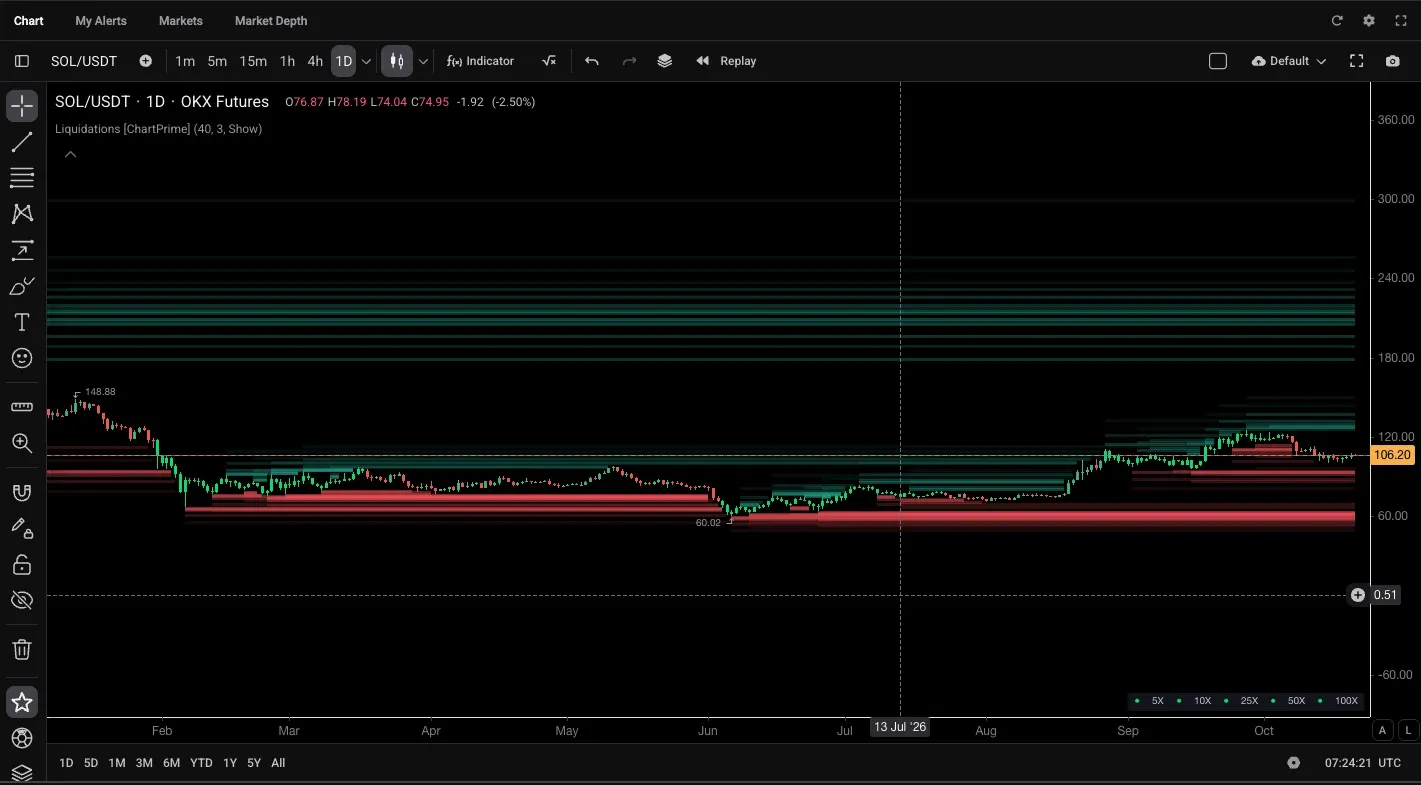
Most liquidation map tools are separate websites: you read the map in one tab and place the trade in another. Altrady puts liquidation levels on the chart you trade from. The Liquidations indicator, built by ChartPrime, estimates where positions opened at 5x, 10x, 25x, 50x and 100x leverage would be liquidated, starting from recent swing highs and lows, and draws those levels as bands on the price chart. Levels that are still active are highlighted, so you can see which zones price has not cleared yet.
How to add the Liquidations indicator
- Open a chart in the Altrady trading terminal.
- Click Indicator in the chart toolbar.
- Search for liquidations and select Liquidations [ChartPrime].
- Use the legend in the bottom-right corner of the chart to read the leverage bands from 5x to 100x.
![Altrady indicator search showing Liquidations [ChartPrime]: estimated liquidation levels at 5x to 100x leverage from recent pivots, with active bars highlighted](https://cdn-web.altrady.com/altrady_add_liquidations_indicator_c83a4ded23.webp)
Liquidation levels next to your own position
Because the levels sit on your trading chart, you see them next to your own orders. In the example below, a paper BTC position shows its DCA entries, two take-profit levels and a stop-loss against the liquidation bands, so you can check whether a stop sits inside a crowded long zone or whether a take-profit is placed just before a band of short liquidations. You can move those orders from the same chart.
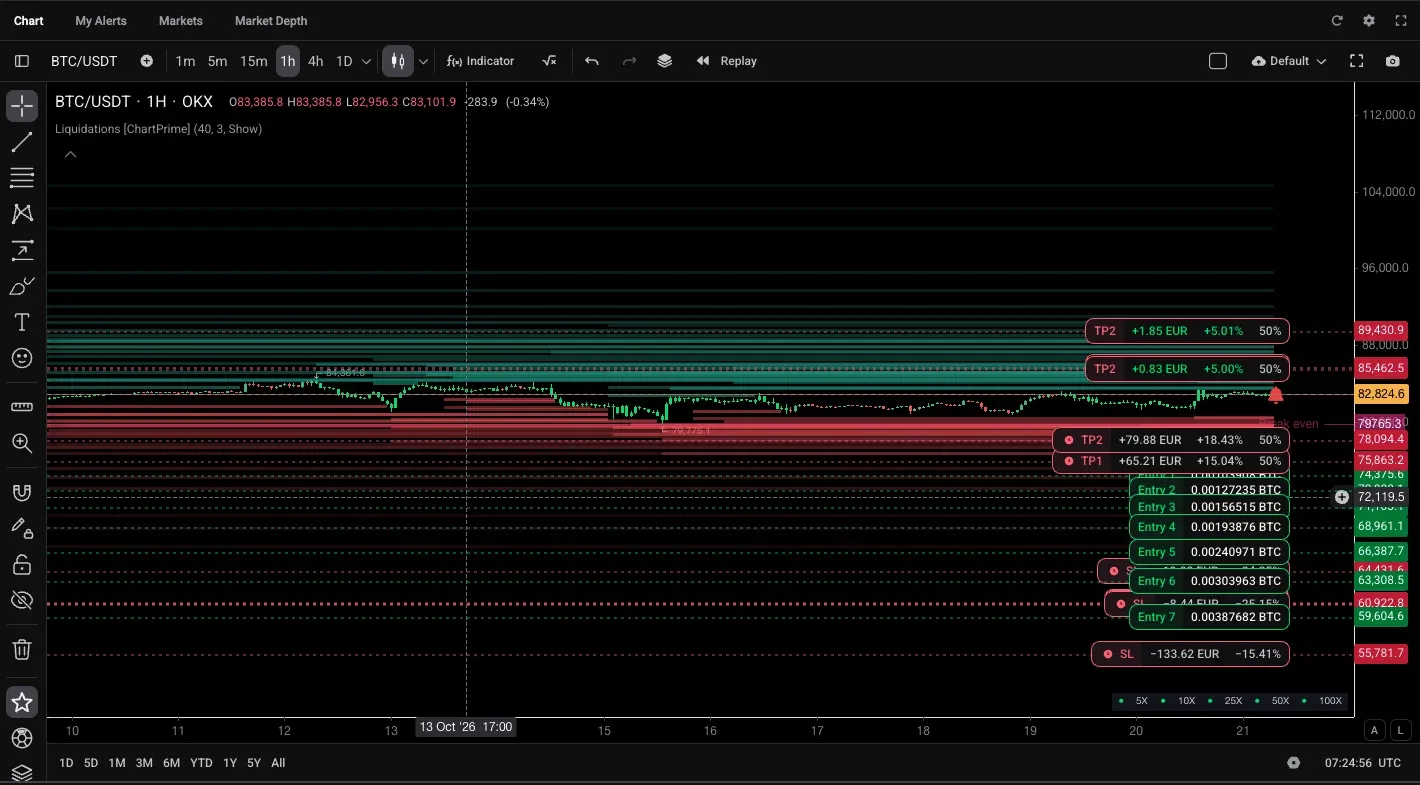
Like every tool that does not use public on-chain positions, the indicator shows estimates, not the exact liquidation prices exchanges hold. Use it the same way as any liquidation map: as a view of where forced orders could speed up a move, not as a price target. You can practise with it on a paper trading account before using real funds.
How Liquidation Maps Are Calculated
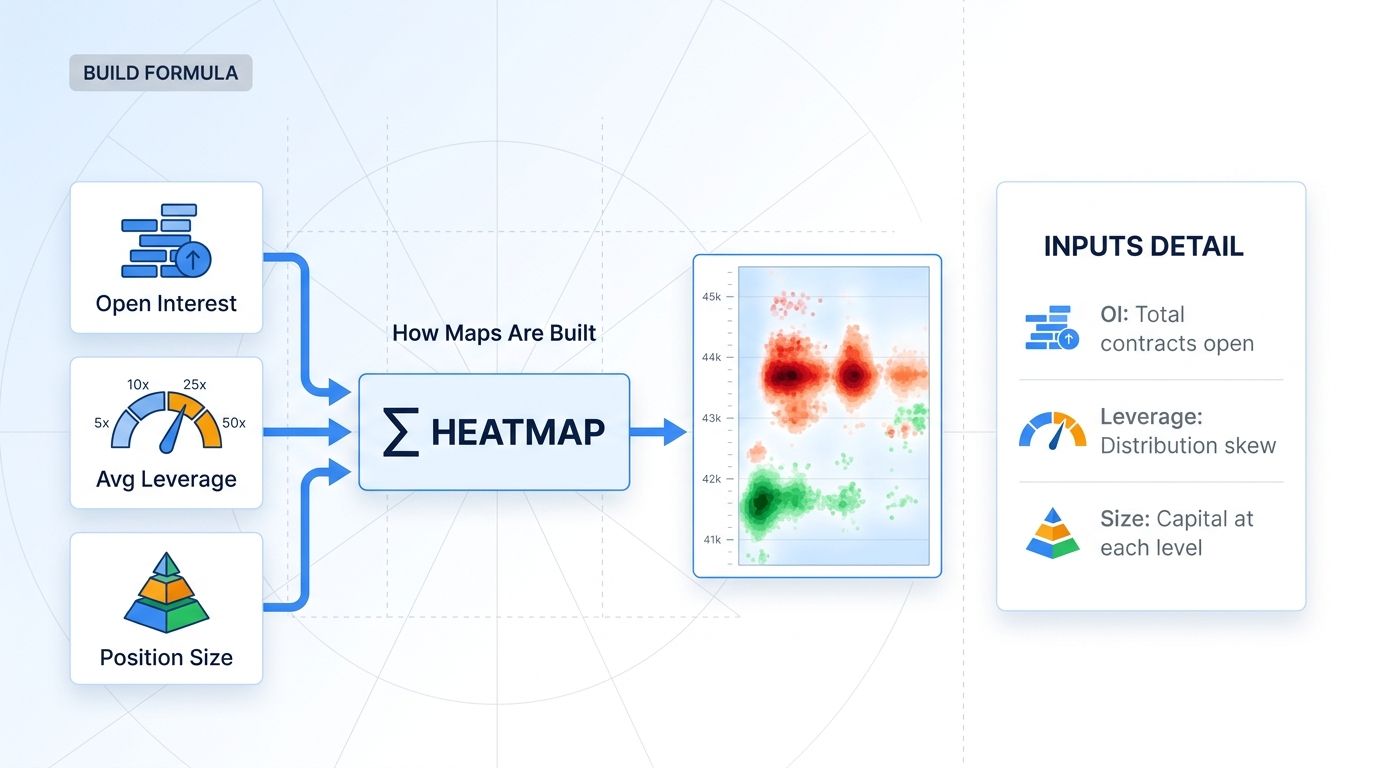
Centralized exchanges do not publish every trader's liquidation price, so most tools estimate them. They combine three inputs:
- Open interest: the total value of open futures positions, and how it changes as trades happen at each price.
- Assumed leverage: tools spread new positions across leverage tiers. CoinGlass and Hyblock describe their high-leverage tiers as 25x, 50x and 100x; CoinAnk colours bars from 25–40x up to 80–100x.
- Entry prices: the prices where open interest grew, which tell the model where positions were opened.
From these, the tool calculates where each modelled position would be liquidated. The result is an estimate. CoinGlass says actual liquidations "may be lower than the levels shown", and Hyblock notes that its heatmap tracks where liquidation levels are opened but not when positions are closed early, so real liquidations end up lower.
Hyperliquid is different. Positions on Hyperliquid are public on-chain, so a map built from them can show each liquidation price exactly. That makes it accurate for Hyperliquid, but it covers only part of the derivatives market.
Liquidation Map vs Liquidation Heatmap
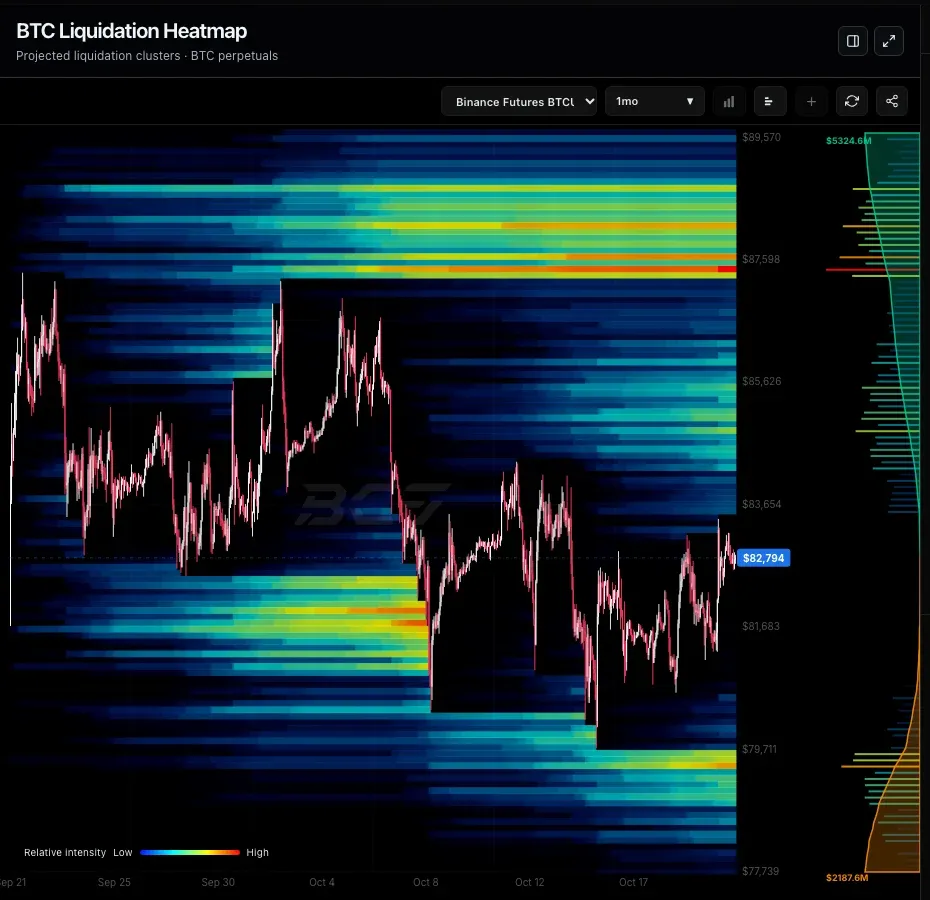
The two names are often used for the same thing, but they are different charts.
| Liquidation map | Liquidation heatmap | |
|---|---|---|
| What it shows | Liquidation value by price level, right now | Estimated liquidation levels by price and time, as colour intensity |
| Typical layout | Price on the horizontal axis, bars and cumulative lines | Price chart with a coloured band behind it |
| Best for | Seeing where open positions are crowded today | Seeing how zones built up, held or were cleared over days or weeks |
| Not to confuse with | Liquidation data: liquidations that already happened, such as the totals shown after a big move | |
Do Liquidation Clusters Act as Price Magnets?
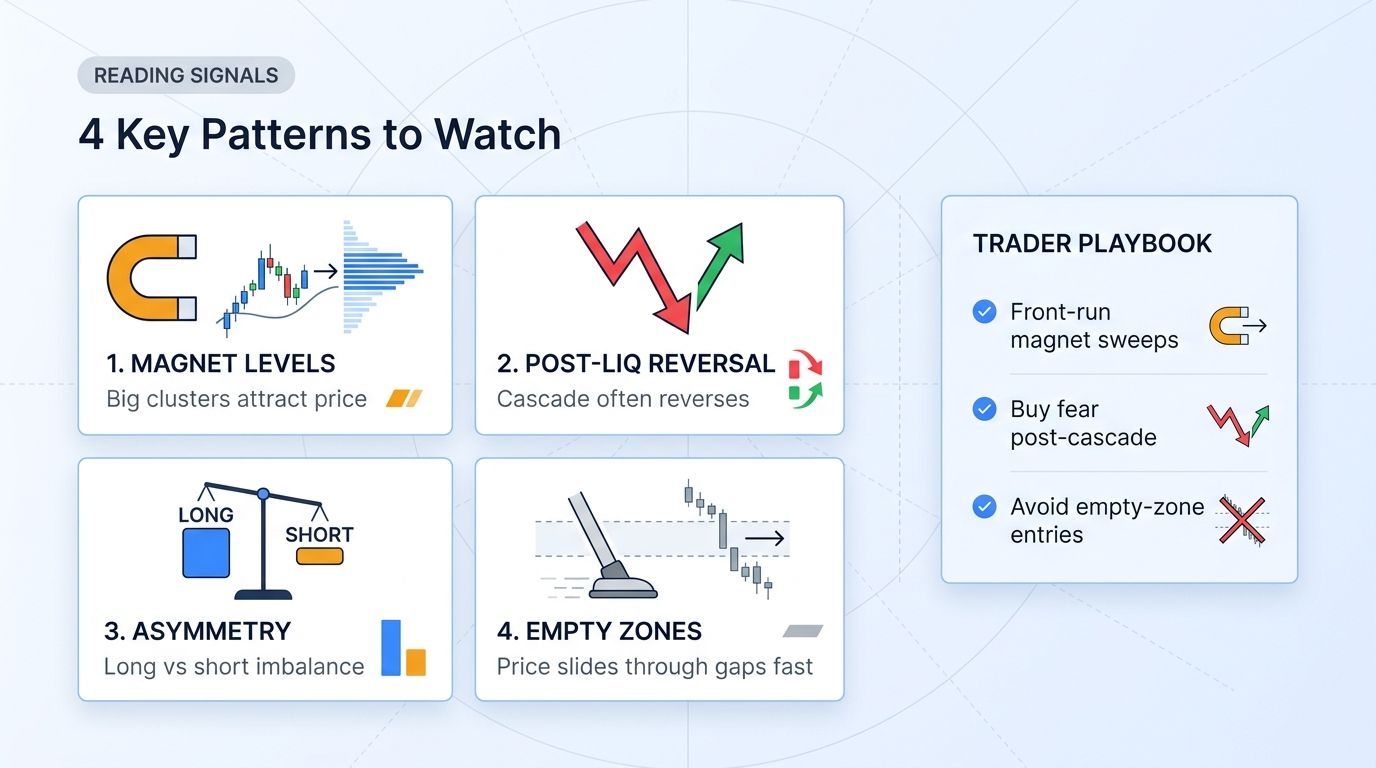
Many traders describe large clusters as magnets that price is drawn to. The evidence is weaker than that. CoinGlass's own Liquidation Levels page says a level "is reached about as often as a random price the same distance away" and calls the zones "a risk map, not a forecast". CoinAnk states that its chart is "not a probability of price reaching that level".
What liquidation clusters do tell you is what happens if price gets there. A move into a large cluster can trigger forced orders that make the move faster and longer than it would otherwise be. That is useful for managing risk, and much less reliable as a reason to predict direction.
How Traders Use Liquidation Maps
Placing stops outside crowded zones
If your stop sits inside a large group of long liquidations, a fall into that zone can bring a burst of forced selling that runs through your stop. Some traders place stops beyond the cluster instead, accepting a wider stop and a smaller position so the money at risk stays the same.
Choosing leverage
The map shows how close the crowded high-leverage levels are. If 50x and 100x liquidations sit 1–2% from price, a normal swing can trigger them, which is a reason to use lower leverage yourself and keep your own liquidation price far away.
Reading imbalance
Comparing total liquidations above and below price shows which side a sharp move would hit harder. In the example above, about $1.43 billion of longs sat below price against $946 million of shorts above. Traders treat this as context alongside trend and key levels, not as a signal.
Combining with support and resistance
A liquidation cluster sitting on a level that already matters on the chart, such as a range high, a prior swing high or low or an order block, is more meaningful than one in empty space.
Watching after a cascade
After a large liquidation move, the cluster that was hit is cleared. Watching where new positions build up again shows where the next crowded zone is forming.
Best Liquidation Map Tools in 2026
Checked on each tool's official website on 21 October 2026. Prices change, and some tools did not publish all of their limits.
| Tool | What it offers | Coverage | Free access | Paid |
|---|---|---|---|---|
| Altrady | Liquidations indicator on the trading chart, with your positions, TP and SL | Any market you chart in Altrady; 5x to 100x leverage bands | 5-day free trial, no card required | Altrady plans from €20/month billed yearly |
| CoinGlass | Liquidation map, heatmap and liquidation data | Major exchanges, including Binance, OKX, Bybit, Hyperliquid, Gate and Bitget | Yes; the free heatmap covers BTC and ETH with 6- and 12-month views and no auto-refresh | Prime $28 for 30 days, $78 for 90 days, $268 for a year |
| CoinMarketCap | Liquidation map and heatmap | Hyperliquid only, with exact levels; "All Exchanges" marked coming soon | Viewable on the site | Not stated |
| Hyblock Capital | Liquidation levels over time and heatmap | Binance Futures (BTC, ETH and 70+ altcoins), BitMEX, Bybit | Basic plan is free; liquidation levels and heatmap are listed under Advanced | Advanced and Professional prices not shown publicly |
| CoinAnk | Liquidation map and heatmap | Binance derivatives for the heatmap; aggregated and per-exchange maps | Charts viewable on the site | VIP pricing not confirmed |
| Bitcoin Counterflow | BTC liquidation heatmap and map | BTC perpetuals on Binance, Bybit, OKX, Bitget, Hyperliquid | Free plan with ads | Map and heatmap listed in MAXI, $25/month |
| Gate | Liquidation map | BTC/USDT, 1D, 7D and 30D views | Viewable on the site | Not stated |
Two tools often listed alongside these work differently. Bookmap's Liquidation Indicator shows liquidations that exchanges actually report, not estimated levels, and needs a Global plan. Velo charts past liquidations and offers liquidation heatmaps for some Hyperliquid charts, rather than a full liquidation map. TradingView does not include a built-in liquidation map; community scripts that claim to show one use their own estimates.
Common Mistakes With Liquidation Maps
- Treating clusters as targets. A cluster shows where forced orders would fire, not where price will go. Many clusters are never reached.
- Forgetting it is an estimate. Most maps are models, and real liquidations are usually smaller than the levels shown.
- Reading one venue as the whole market. A Hyperliquid-only map and a Binance-only map can look very different. Check what the chart covers.
- Using an old snapshot. Positions open and close all the time. A map from yesterday can be out of date after one volatile session.
- Ignoring the higher timeframe. A cluster close to price on a short timeframe matters little against a strong trend on the daily chart.
- Using high leverage to trade a cluster. Trading toward a cluster with high leverage risks becoming part of the next cascade yourself.
Managing Liquidation Risk on Your Own Positions
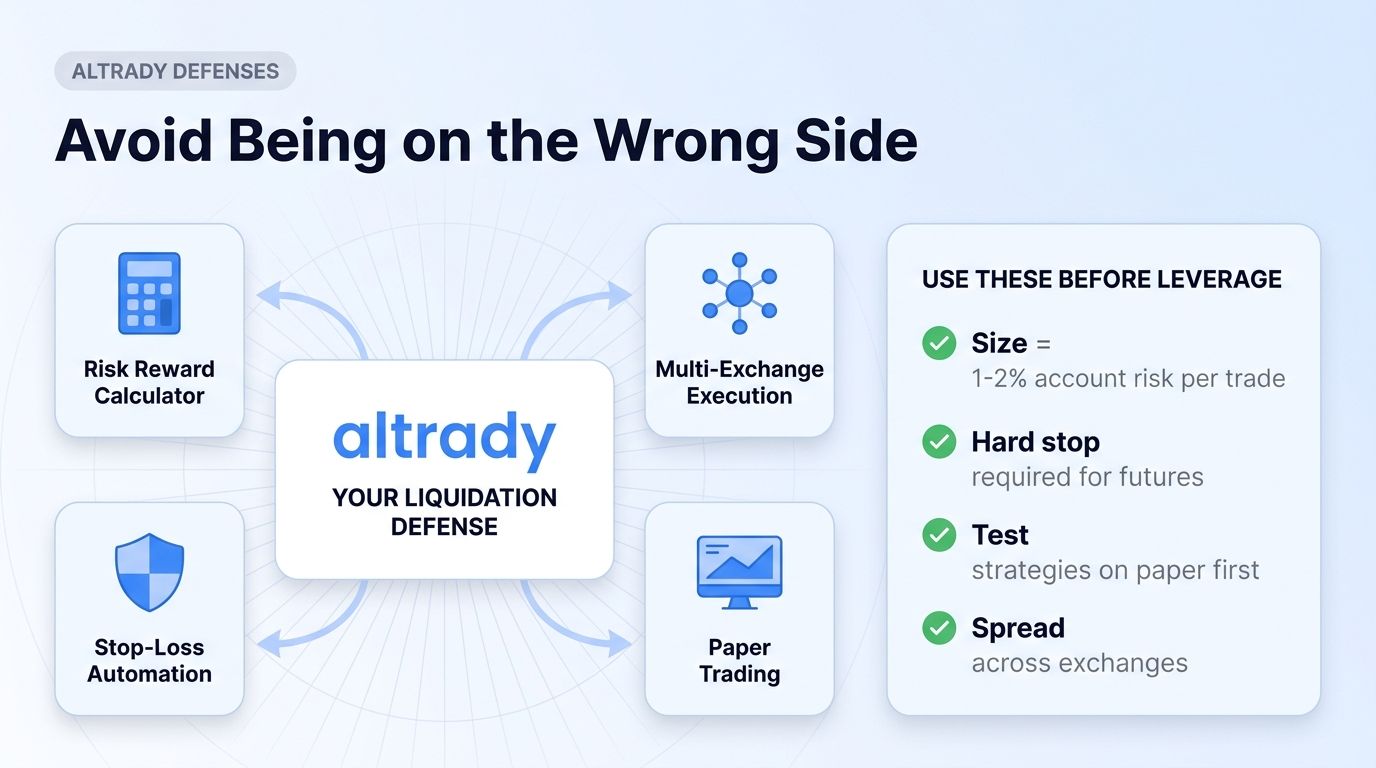
A liquidation map shows other traders' risk. Your own risk comes down to position size, leverage and where your stop is. In Altrady you can read the liquidation levels on the same chart, set the stop loss and take profit before you enter, size a position from the amount you are willing to lose with the risk/reward calculator, trade futures across your connected exchanges from one terminal, and practise liquidation-aware setups with paper trading before using real funds.
Frequently Asked Questions
What is a liquidation map in crypto?
A liquidation map is a chart showing the price levels where leveraged futures positions would be forcibly closed, and how much position value sits at each level. Long liquidations appear below the current price and short liquidations above it. Most maps estimate these levels from open interest and assumed leverage.
How do you read a liquidation map?
Find the current price, then read the bars on each side: bars to the left are long liquidation levels and bars to the right are short ones, with taller bars meaning more value at risk. The cumulative lines show the total that would be liquidated if price moved that far. Large clusters close to price show where a move could speed up.
What is the difference between a liquidation map and a liquidation heatmap?
A liquidation map shows estimated liquidation value by price level at one moment. A liquidation heatmap shows estimated liquidation levels over time as colour intensity behind a price chart, so you can see how zones built up and cleared.
Are liquidation maps accurate?
Most are estimates, because centralized exchanges do not publish each trader's liquidation price. Tools model them from open interest, trades and assumed leverage, and actual liquidations are usually smaller than shown. Maps built on Hyperliquid's public positions, such as CoinMarketCap's, show exact levels for that venue only.
Does price always go to liquidation clusters?
No. CoinGlass's own analysis says a liquidation level is reached about as often as a random price the same distance away. Clusters show where forced orders could add to a move if price gets there, not where price is going.
Which liquidation map is best for beginners?
If you trade on Altrady, the Liquidations indicator is the simplest place to start, because the levels appear on the chart where you place your orders. As a standalone website, CoinGlass is the most widely used and has a free tier, and CoinMarketCap's map is easy to read and exact for Hyperliquid only. Whichever you use, check which exchanges it covers.
Does Altrady have a liquidation map?
Yes. Altrady's Liquidations indicator, built by ChartPrime, draws estimated liquidation levels at 5x to 100x leverage on the trading chart, based on recent swing highs and lows. Add it from Indicator in the chart toolbar by searching for liquidations, and read it next to your own entries, take-profits and stop-losses.
Can a liquidation map help me set my stop loss?
It can help you avoid placing a stop inside a large liquidation cluster, where a burst of forced orders could run through it. Some traders place stops beyond the cluster and reduce position size so the amount at risk stays the same. It does not guarantee your stop will not be hit.
How often do liquidation maps update?
It depends on the tool. CoinMarketCap and CoinAnk say their maps refresh about every 60 seconds, while some free tiers do not refresh automatically. During fast markets, check the time of the data before acting on it.